
When someone buys from you, your site can send Google a scrambled copy of their email address or phone number. Google uses it to match the sale back to the ad they clicked, even when cookies are missing. Google calls this user-provided data.
If that data is missing or in the wrong format, your Google Ads reports can quietly show fewer sales than they could. On 11 November 2026, Google Analytics added a new diagnostic that alerts you when this data does not arrive, or arrives in poor shape. PPC Land covered it in detail on 22 November 2026.
With Black Friday on 27 November and Cyber Monday on 30 November, this is a quick check worth doing this week.
For ecommerce and digital directors, the lesson is short: Google Analytics now tells you when the customer details behind your ad matching are missing or badly formatted. Look for the alert before Black Friday, not after.
What Google launched
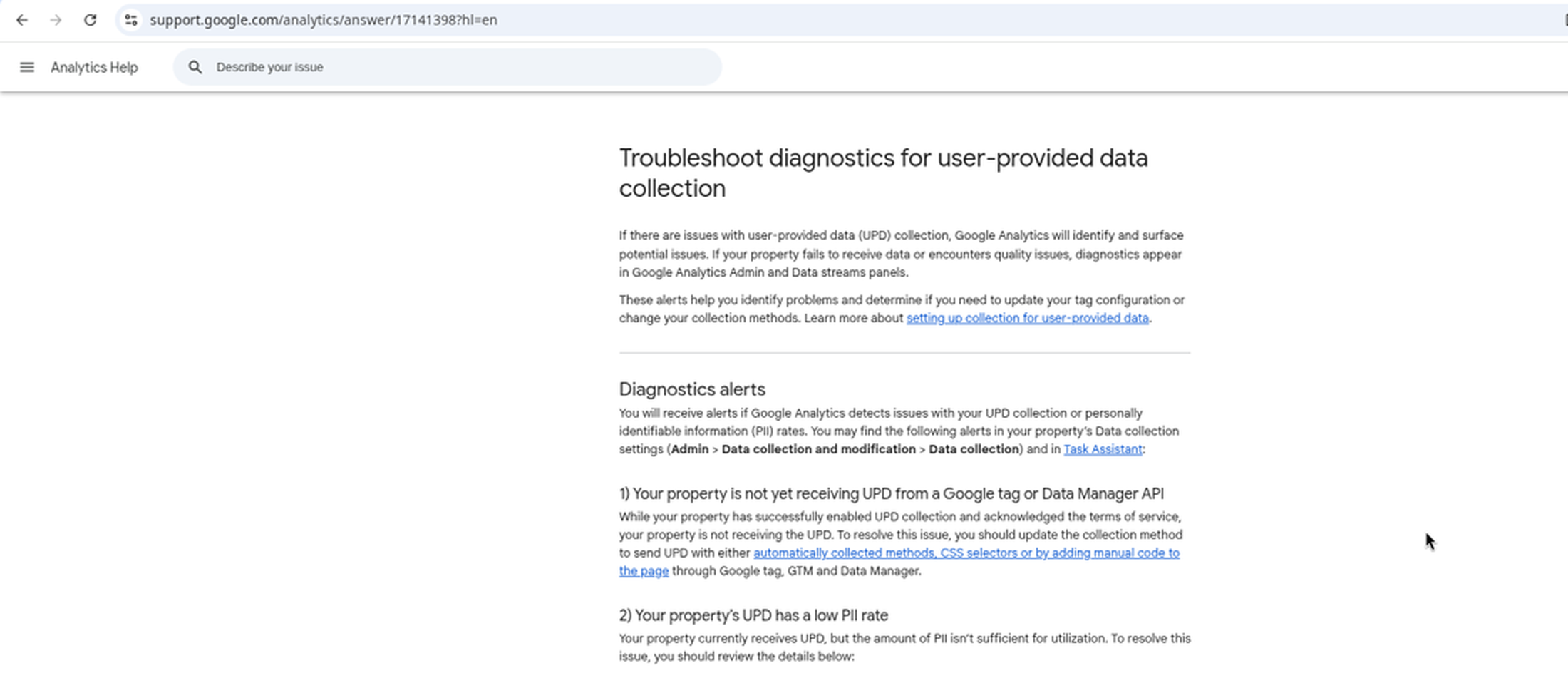
Google's "What's new in Google Analytics" page says:
"We’ve launched a new diagnostic to alert users of issues with user-provided data (UPD) implementation. If your property fails to receive data or encounters quality issues, diagnostics appear in Google Analytics Admin and Data streams panels."
In plain words, here is what Google's help page says:
- Alert 1: nothing is arriving. "Your property is not yet receiving UPD from a Google tag or Data Manager API." The feature is switched on and the terms are accepted, but no customer data comes through.
- Alert 2: what arrives is not good enough. "Your property’s UPD has a low PII rate." Google says the amount of personal data "isn’t sufficient for utilization".
- Where to look. In Admin, under Data collection and modification, then Data collection, and in Task Assistant.
- Common causes. Fields sent empty, emails without an "@", phone numbers without a country code, and pages not served over HTTPS. Google also says signed-in customers "may not have re-entered their first-party information".
- Automatic set-up is weaker. If you let Google find the data on the page by itself, Google says "you may receive a higher PII rate" by adding code to the page instead.
What Google does not say: what "low" means in numbers, how often the alert is checked, or how many extra sales a fix would match. As PPC Land points out, the page gives no threshold.
Sources: Google Analytics Help — Troubleshoot diagnostics for user-provided data collection; What’s new in Google Analytics, 11 November 2026; PPC Land, Luis Rijo, 22 November 2026.
What it means, in plain terms
Think of this data as the label on a parcel. If the label is blank or smudged, the parcel still exists, but nobody can tell who it belongs to. Your sale still happened. Google Ads just cannot link it to the ad that earned it.
Three things matter for your P&L:
- Unmatched sales make ads look worse than they are. If Google Ads sees fewer of your sales, campaigns look less profitable on paper, and someone may cut spend that was actually working.
- Bidding learns from what it can see. Smart Bidding sets bids from the sales it is told about. In peak week, when bids move fast, it is better that it learns from as many real sales as possible.
- Small format mistakes are common, and cheap to fix. A phone number sent as "07..." instead of "+447...", or a blank email field on the thank-you page, can quietly lower your match rate. These are developer fixes measured in hours, not projects.
One UK detail: Google's page gives "UK" as its example country code, but under the ISO 3166-1 alpha-2 standard it cites, the code for the United Kingdom is "GB". Ask your developer which value your set-up sends, and check it against Google's own set-up guide.
And one thing not to "fix": in the UK, a shopper who says no to ad cookies should not have their details sent. A lower rate because of consent is normal. Never work around a customer's choice to raise a number.
We wrote about the other side of this, sending the same data twice, in GA4’s new Data Manager: one door for your sales data.
The director checklist
- Look for the alert today. Ask whoever runs GA4 to open Admin, then Data collection and modification, then Data collection, and Task Assistant. Is either alert showing?
- Confirm the feature is meant to be on. If user-provided data is switched on but nothing arrives, that is the first alert. Find out who switched it on and how it should be sending data.
- Test the thank-you page. Use Google Tag Assistant to place a test order. Google says the value after "tv.1~em." should be scrambled text. A code such as e0 (bad format) or e3 (page not secure) means the set-up needs fixing.
- Check the formats. Emails with an "@", phone numbers starting with "+44" and no spaces, and the right country code.
- Fix small, tested things before Thursday, then freeze. A format fix tested on a few orders is fine this week. Bigger changes, such as moving from automatic collection to code, should wait until after Cyber Monday.
- Judge on your own orders. After the fix, compare Google Ads conversions with orders in your shop platform week by week. The gap should narrow; if it doesn't, keep asking why.
Related reading: Safari 27 and tags that read customer emails and Google Ads Data Strength Uplift: what to check before it goes in the board deck.
Not sure your Google Ads reports match your real sales?
Run our free tracking scan at audit.taggurus.co.uk for a quick health score on your GA4 and Google Ads tracking.
Want a senior second opinion before Black Friday? Email info@taggurus.co.uk or book a meeting today to discuss.
#39/100 in our series “100 important things to know in the digital world”.
FAQ
Q: What is user-provided data in Google Analytics?
A: Customer details such as email, phone number or address that your site sends to Google, scrambled (hashed) in the browser. Google uses it to match sales to signed-in Google users, for features like enhanced conversions.
Q: Where do the new alerts appear?
A: Google says in Admin, under Data collection and modification, then Data collection, and in Task Assistant. The release note also mentions the Data streams panel.
Q: What does "low PII rate" mean?
A: Google says data is arriving, but "the amount of PII isn’t sufficient for utilization". It does not publish the number that triggers the alert.
Q: We have no alert. Are we fine?
A: Not necessarily. You only get these alerts if user-provided data is switched on. If it is off, Google Ads may be matching fewer sales than it could. That is a separate decision to make with your team, after peak.
Q: Should we fix it before Black Friday?
A: Small, tested format fixes, yes. Bigger tracking changes are safer after Cyber Monday, so your peak-week numbers stay comparable.
