
On 6 November 2026 Google released Data Manager in Google Analytics as a beta. It is a new tab in GA4 Admin that puts your data streams, product links and first-party data imports in one place, with a map of where your data comes from and where it goes. Search Engine Roundtable covered it on 9 November, and PPC Land led its 8 November report with the warning buried in Google’s help page.
For ecommerce and digital directors, the lesson is short: every sale should reach Google Ads through one door. Before anyone connects anything in GA4’s new Data Manager, check what already comes in through Google Ads.
What Google released
Google’s release note on the What’s new in Google Analytics page, dated 6 November 2026, says:
“We’ve launched Data Manager in Google Analytics, a unified hub in your admin console that enables you to seamlessly connect and control product links, data streams, and first-party data. You can also use Data Manager to address diagnostic alerts and monitor connection health.”
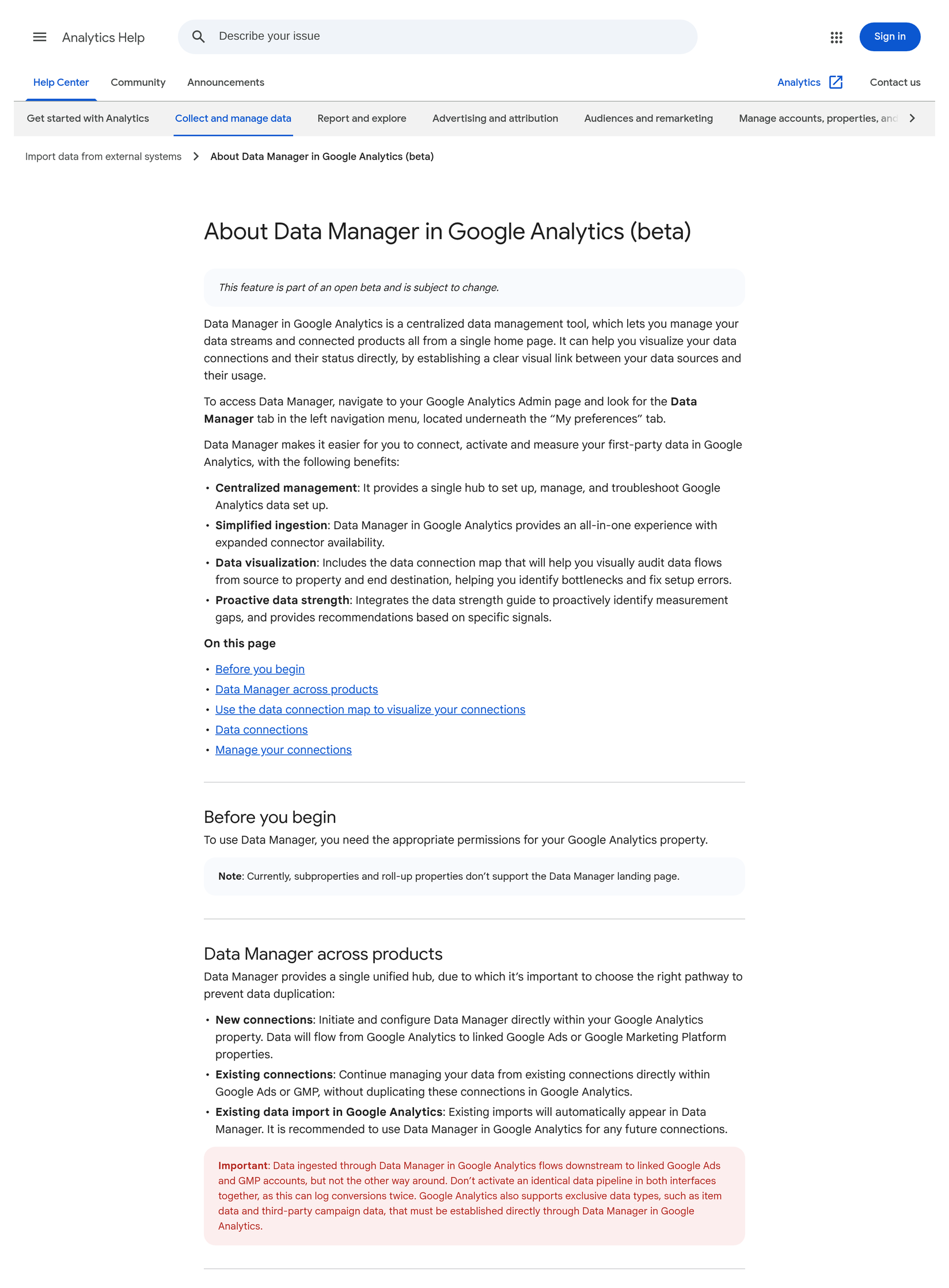
The help page, About Data Manager in Google Analytics (beta), adds the detail:
- Where it is: GA4 Admin → Data Manager, in the left menu under “My preferences”. You need “the appropriate permissions” for the property. Google does not name the roles.
- What it shows: a data connection map with your GA4 property in the middle, data sources on the left (such as Google Tag Manager, a CRM, a Google Ads link or an offline file) and destinations on the right. Broken sources show a red status and a Fix button.
- What it adds: the data strength guide, which Google says helps “identify measurement gaps” and gives recommendations.
- What it leaves out: “Currently, subproperties and roll-up properties don’t support the Data Manager landing page.” Those are Analytics 360 features.
- It is a beta: “This feature is part of an open beta and is subject to change.”
Then comes the part that matters for your numbers. Google sets out three pathways — new connections start in GA4 and flow on to linked Google Ads or Google Marketing Platform accounts; existing connections built in Google Ads or GMP stay there, “without duplicating these connections in Google Analytics”; and existing GA4 imports appear in Data Manager automatically. In an “Important” box, Google warns:
“Data ingested through Data Manager in Google Analytics flows downstream to linked Google Ads and GMP accounts, but not the other way around. Don’t activate an identical data pipeline in both interfaces together, as this can log conversions twice.”
Sources: Google Analytics Help — About Data Manager in Google Analytics (beta); What’s new in Google Analytics — 6 November 2026; PPC Land, 8 November 2026; Search Engine Roundtable, 9 November 2026.
What it means, in plain terms
- Think of it as a wiring diagram. For the first time, GA4 shows on one screen which tools feed it and which Google products it feeds. That is useful. Most businesses have never had that picture.
- Data now runs one way. Data you bring in through GA4 Data Manager flows on to Google Ads. Data you bring in through Google Ads Data Manager does not flow back into GA4.
- Two doors, one sale, two counts. Say your team already uploads phone or in-store orders to Google Ads through Google Ads Data Manager. Someone sees the shiny new tab in GA4 and builds the same feed again there. Google Ads can now receive that sale twice — once directly and once via GA4. Google’s own words: this “can log conversions twice”.
- Google does not say it will catch it for you. The help page states the risk. It does not say how duplicates are spotted or fixed. Prevention is your job.
- Google wants new connections to start in GA4. “It is recommended to use Data Manager in Google Analytics for any future connections.” Existing Google Ads connections should stay in Google Ads. That is a new rule for who sets things up where.
This sits next to three earlier notes. Google Ads multi-source conversions covered order data backing up the tag without double counting. Google Ads Data Strength Uplift covered what “recovered” conversions really mean. GA4 conversion suggestions covered deciding what Google Ads should chase. Today is about the door each sale uses to reach Google — and making sure there is only one.
Why it matters for the P&L
- Double-counted sales make Google Ads look better than it is. If one order is reported twice, return on ad spend looks higher, and so does every campaign that touched it. Budget follows the inflated number.
- Smart Bidding believes what it is told. Campaigns that bid on conversions will chase more of what seems to be working. A doubled count changes what the system thinks is working, so it can push spend in the wrong direction.
- Peak is the worst time to find out. Black Friday is 27 November and Cyber Monday is 30 November. A duplicate connection created this week would inflate results through your biggest trading days.
- Two teams, one pipe. If your agency runs Google Ads and an in-house team (or another agency) runs GA4, each side can now build a connection that collides with the other’s. Somebody has to own the whole map.
- The map is a free audit. Used well, it shows broken feeds, stale imports and connections nobody remembers. Fixing those can improve the data your bidding relies on — without buying anything.
Director checklist
Hand these to your analytics or paid media lead. Most can be done in 30 minutes.
- Hold new connections until after Cyber Monday. No new imports or connections in GA4 Data Manager or Google Ads Data Manager before 1 December unless steps 2–4 are done and signed off.
- List every Google Ads data feed today. In Google Ads, open Data Manager and note every connection: offline or CRM conversions, customer lists, store sales, Shopify or other platform links. Write down what each sends and who owns it.
- Open GA4 Admin → Data Manager and read the map. Note every source on the left and every destination on the right. If the tab is not there yet, diary a re-check next week. If your business uses a roll-up or subproperty, check the source property instead — those are not supported.
- Match the two lists. For each kind of data (offline sales, customer data, purchases), there should be one route into Google Ads. If the same feed appears in both places, pause one before peak, with your paid media lead in the room.
- Check Google Ads goals for the same sale twice. In Google Ads conversion settings, look for two primary conversion actions that count the same purchase (for example, a GA4-imported purchase and a Google Ads tag or upload). Keep one primary; set the other to secondary.
- Treat red “Fix” buttons as changes, not chores. A fix can change what flows into Google Ads. Log who pressed it, when, and what changed, and check conversion counts the next day.
- Name one owner for the whole map. One person (in-house or agency) signs off any new connection in GA4 or Google Ads. Put it in writing.
- Judge Google Ads on your own orders. Each week, compare Google Ads conversions with your own order system. A sudden jump with flat orders is a duplicate until proven otherwise.
Questions to ask your team this week
- Who can see GA4 Admin → Data Manager, and has anyone already connected something there?
- What data do we send to Google Ads today, and through which door — Google Ads Data Manager, GA4, the tag, or an app?
- Do we have any purchase that is counted by two primary conversion actions in Google Ads?
- Who owns the GA4 property and who owns Google Ads — and do they talk before connecting data?
- If Google Ads conversions jump next week, how fast would we notice against our own orders?
Caveats
- It is a beta. Google says it is “subject to change”. Screens and rules may shift.
- Roll-out may be gradual. Search Engine Roundtable’s editor said he did not see the tab yet on 9 November. Your property may not have it today.
- Permissions are not spelled out. Google says you need “the appropriate permissions” but does not name the roles.
- No roll-up or subproperty support yet, and Google gives no date.
- Google does not explain how duplicates are detected. The help page only warns about them. We are not claiming GA4 will flag a duplicate for you.
- Some data types must start in GA4. Google says item data and third-party campaign data (for example, cost from other ad platforms) “must be established directly through Data Manager in Google Analytics”.
- The checklist is Tag Gurus advice, built on Google’s documented rules. Adapt it to your stack.
Final thoughts
#30/100 — Every sale should reach Google Ads through one door. Before you connect anything in GA4’s new Data Manager, check what already comes in through Google Ads.
Data Manager is a genuinely useful map. It is also a new set of buttons, less than three weeks before Black Friday, with a warning from Google that the same feed in two places can count a sale twice. Read the map first. Match it with Google Ads. Keep one door per sale. Then let the bidding learn from numbers you can trust.
Not sure what flows into GA4 and Google Ads today? Run our free GA4 and GTM tracking scan at https://audit.taggurus.co.uk/, email info@taggurus.co.uk, or book a meeting today to discuss.
FAQ
Q: Where is Data Manager in GA4?
A: In GA4 Admin, as a Data Manager tab in the left menu under “My preferences”, per Google’s help page. It is a beta and may not be visible in every property yet.
Q: Does data flow both ways between GA4 and Google Ads?
A: No. Google says data brought in through Data Manager in GA4 flows on to linked Google Ads and GMP accounts, “but not the other way around”.
Q: How can a sale be counted twice?
A: If the same data pipeline is active in both GA4 Data Manager and Google Ads Data Manager, Google says it “can log conversions twice”. For example, the same offline orders uploaded in both places.
Q: Should we move our existing Google Ads connections into GA4?
A: Google says existing Google Ads or GMP connections should keep being managed there, without duplicating them in GA4. It recommends GA4 Data Manager for future connections.
Q: Do our existing GA4 imports need rebuilding?
A: No. Google says existing GA4 imports “will automatically appear in Data Manager”.
Q: Does it work for Analytics 360 roll-up properties?
A: Not yet. Google says subproperties and roll-up properties don’t currently support the Data Manager landing page.
Sources
- https://support.google.com/analytics/answer/18107176 (Google Analytics Help, “About Data Manager in Google Analytics (beta)”; open beta, subject to change; Admin → Data Manager under “My preferences”; appropriate permissions; subproperties and roll-up properties not supported; three pathways — new connections in GA4 flow to Google Ads/GMP, existing Google Ads/GMP connections stay there, existing GA4 imports appear automatically; Important box: flows downstream “but not the other way around”, “Don’t activate an identical data pipeline in both interfaces together, as this can log conversions twice”; data connection map, red status and Fix button; data strength guide)
- https://support.google.com/analytics/answer/9164320 (Google Analytics Help, “What’s new in Google Analytics”; 6 November 2026 — Data Manager in Google Analytics (beta))
- https://ppc.land/google-analytics-data-manager-duplicate-ads-setups-can-log-conversions-twice/ (PPC Land, Luís Rijo, 8 November 2026: one-way flow and double-count risk; help page does not explain how duplicates are detected; roles not named; no beta end date)
- https://www.seroundtable.com/data-manager-in-google-analytics-42480.html (Search Engine Roundtable, Barry Schwartz, 9 November 2026: “New Data Manager In Google Analytics Beta”; author did not yet see the tab)
