
Most Google Ads accounts track more than the sale. Add to basket, begin checkout, email sign-ups, quiz completions. Teams usually set these up as secondary conversions: steps you can watch in reports, but that Google's automated bidding does not chase.
For years, the simple rule was: primary conversions steer the bidding, secondary ones are just for watching.
That rule has now changed. Google Ads has published a new help page called About Search Journey Awareness. It says Smart Bidding now learns from conversion actions your account is not bidding towards. PPC Times spotted the new page on 16 November 2026 and reported it on 17 November 2026.
For ecommerce and digital directors, the lesson is short: the steps you only "watch" in Google Ads now teach its bidding. Tidy them up, keep the sale as the goal, and don't restructure in peak week.
What Google changed
Smart Bidding is Google's automated bidding. It decides how much to bid in each auction to win sales, using strategies such as Target ROAS or Maximise conversion value. Most ecommerce Search budgets now run on it.
Google's new help page describes the change like this:
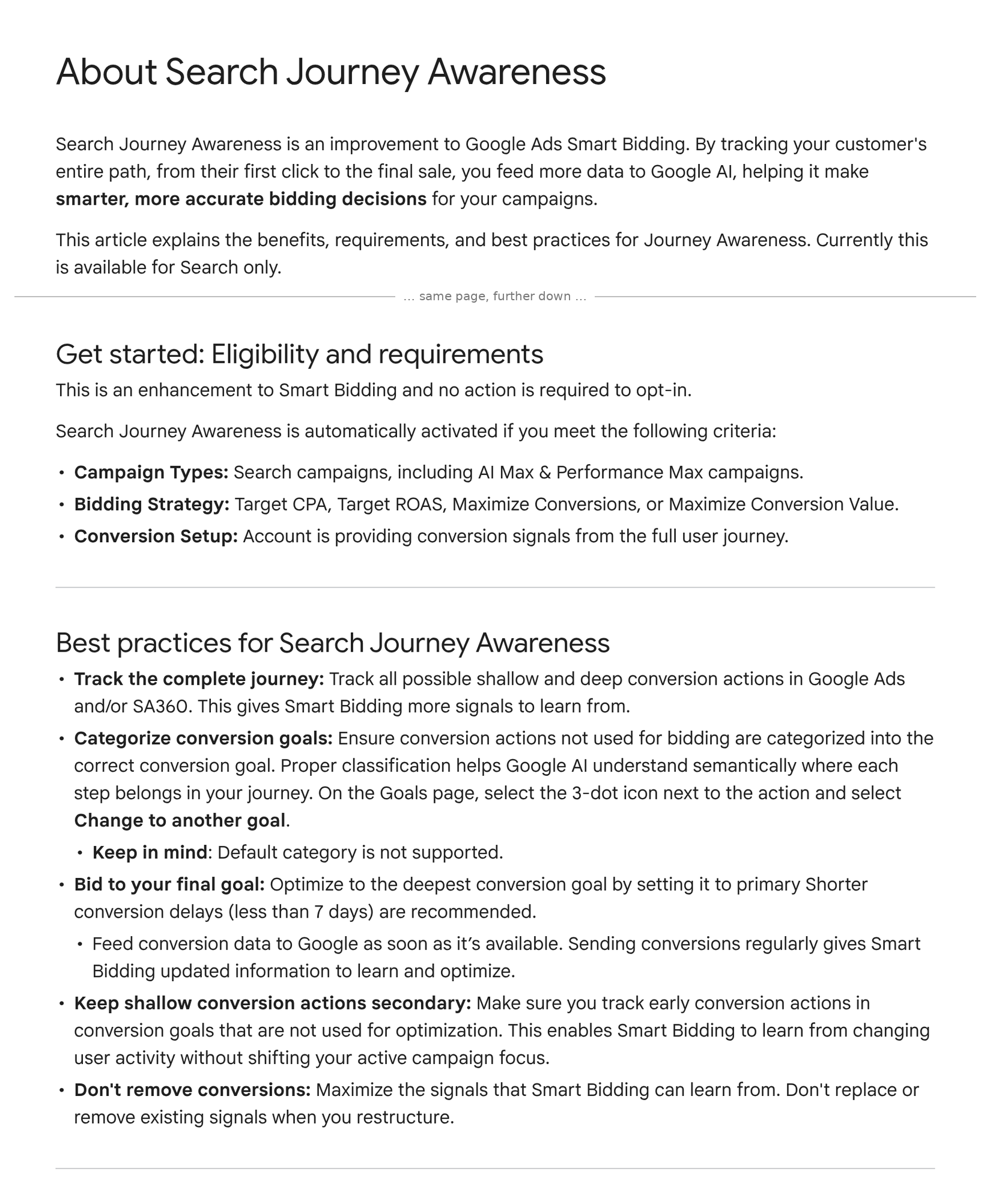
"Search Journey Awareness is a native improvement to Smart Bidding models that improves bidding predictions by utilizing conversion actions your account is not currently optimizing towards."
In plain words, here is what Google's pages say:
- It is switched on for you. "No action is required to opt-in." The FAQ adds that there is no "on/off" switch: "All Search campaigns using Smart Bidding are automatically journey-aware."
- Where it applies. Search campaigns, including AI Max, and the Search part of Performance Max, using Target CPA, Target ROAS, Maximise conversions or Maximise conversion value. The page says it is "currently available for Search only".
- Goal labels matter. Google asks you to put the steps you don't bid on into the correct conversion goal, because "Proper classification helps Google AI understand semantically where each step belongs in your journey". It also warns: "Default category is not supported."
- Keep the sale as the target. Google's advice is to bid to "the deepest conversion goal", keep early steps secondary, and send conversion data "as soon as it's available".
- Don't delete old actions. "Don't replace or remove existing signals when you restructure."
- Google's main "About Smart Bidding" page now lists Search Journey Awareness as a fifth benefit, saying it learns from "secondary conversions your campaigns aren't actively bidding towards".
What Google does not say: when this started in your account, or how much weight each secondary step gets. There is no report that shows it.
Sources: Google Ads Help — About Search Journey Awareness; Google Ads Help — About Smart Bidding; PPC Times, Thomas Eccel, 17 November 2026.
What it means, in plain terms
Think of your secondary conversions as the notes your bidding system now reads in the background. If the notes are clear, they may help. If they are messy, nobody can tell what they are teaching it.
Google says adding secondary conversions will not hurt performance, because Smart Bidding "is designed to automatically ignore any secondary conversion signals that it predicts are not useful". That is Google's promise, and there is no setting to check it. So the safe move is to make sure the signals are clean in the first place.
Three things matter for your P&L:
- Old and broken steps now have a say. Many accounts carry years of leftovers: duplicate add-to-basket actions, a sign-up that fires on every page, a GA4 import nobody remembers. Before, they only cluttered reports. Now they sit inside the data Google's bidding learns from, on the campaigns that spend most of your Search budget.
- "All conversions" can rise without a single extra sale. Google explains that adding secondary actions changes the "All conversions" column, but not the "Conversions" column. If someone shows you a jump in all conversions after a clean-up, that is a counting change, not new customers.
- Peak week is the worst time to restructure. Google warns that changing the primary goals you bid on can cause "short-term performance fluctuations". Black Friday is on 27 November. A rushed goal change now could swing bids when every click costs the most.
This also updates advice we gave in October. In A suggested conversion is a question, not an answer we said keep shopping steps watch-only. That still holds: don't bid on them. But "watch-only" no longer means "ignored by bidding".
The director checklist
- Ask for one list. Ask your team or agency for every conversion action in Google Ads: name, where it comes from (Google Ads tag, GA4 import, offline upload), primary or secondary, and which goal it sits in.
- Keep one paying action as primary. For most shops that is the purchase, with real order value. Everything else stays secondary.
- Move steps out of "Default". Google says the Default category is not supported. Put each secondary step in the goal that matches it, such as Add to cart or Begin checkout. On the Goals page, use the three-dot menu and "Change to another goal".
- Fix duplicates and broken actions, but don't delete history. If two actions count the same step, ask which one is right. Google advises against removing existing signals, so agree any clean-up with your team rather than deleting in bulk.
- Speed up late sales data. If you upload orders from your shop platform or CRM, send them daily. Google recommends conversion delays of less than 7 days.
- Freeze primary goals from now until after Cyber Monday. Secondary tidying is safe by Google's own account. Primary goal changes wait until December.
- Judge on your own orders. Compare Google Ads revenue with orders, returns and margin in your shop platform, week by week, and keep "All conversions" out of board reports.
Related reading: Some of your exact match clicks are really AI Max and Google’s lift test can’t read sales that come from GA4.
Not sure what your Google Ads bidding is learning from?
Run our free tracking scan at audit.taggurus.co.uk for a quick health score on your GA4 and Google Ads tracking.
Want a senior second opinion before Black Friday? Email info@taggurus.co.uk or book a meeting today to discuss.
#37/100 in our series “100 important things to know in the digital world”.
FAQ
Q: What is a secondary conversion?
A: An action Google Ads records and reports, such as add to basket, but does not use as the target for bidding. It shows in the "All conversions" column, not in "Conversions".
Q: Can we switch Search Journey Awareness off?
A: No. Google says there is no "on/off" switch. All Search campaigns using Smart Bidding are included automatically.
Q: Will messy secondary conversions hurt our results?
A: Google says no: Smart Bidding ignores secondary signals it predicts are not useful. We can't check that from outside, so we suggest keeping the signals clean anyway. It is cheap insurance.
Q: Does this affect Shopping or Demand Gen campaigns?
A: Google's page says it is "currently available for Search only", including AI Max and the Search part of Performance Max. It does not mention other campaign types.
Q: Should we add lots of new secondary conversions before Black Friday?
A: Only if they are real, tested and in the right goal. Google says changing secondary actions does not affect active bidding, but untested tags in peak week are a risk to your site and reports. A short, clean list beats a long one.
Sources
- https://support.google.com/google-ads/answer/18867814?hl=en (Google Ads Help, “About Search Journey Awareness”, read 19 November 2026: “a native improvement to Smart Bidding models that improves bidding predictions by utilizing conversion actions your account is not currently optimizing towards”; “Currently this is available for Search only”; “no action is required to opt-in”; criteria: Search campaigns including AI Max & Performance Max, Target CPA/Target ROAS/Maximize Conversions/Maximize Conversion Value, conversion signals from the full user journey; best practices incl. “Default category is not supported”, conversion delays under 7 days, “Don't replace or remove existing signals when you restructure”; FAQ: no “on/off” switch, “All Search campaigns using Smart Bidding are automatically journey-aware”, Smart Bidding “is designed to automatically ignore any secondary conversion signals that it predicts are not useful”, changing primary bidding goals may cause “short-term performance fluctuations”; “If you add new secondary conversions to a goal that isn't used for optimization, "All Conversions" changes, but "Conversions" doesn't.”)
- https://support.google.com/google-ads/answer/7065882?hl=en (Google Ads Help, “About Smart Bidding”, read 19 November 2026: fifth benefit “Search Journey Awareness”, learning from “secondary conversions your campaigns aren’t actively bidding towards”)
- https://ppctimes.com/news/google-ads-smart-bidding-search-journey-awareness (PPC Times, Thomas Eccel, 17 November 2026: new help page and fifth Smart Bidding benefit detected 16 November 2026; Search only, no opt-in; adding secondary actions changes “All conversions” but not “Conversions”)
