
A lift test is the fairest way to ask "did our ads really cause these sales?". Google Ads runs one called Conversion Lift: it hides your ads from a random group of people, then compares what they buy with everyone else.
Google has just rewritten its help page on how to set one up. Thomas Eccel spotted it for The PPC Times on 15 November 2026, and Search Engine Roundtable also covered the update. The new section, "Data readiness for incrementality", lists the tracking problems Google checks before a test, and a set of setups the test simply cannot use.
The one that will catch many shops out: web conversions imported from GA4 are not supported. And Google says it does not check or flag this for you.
For ecommerce and digital directors, the lesson is short: if your Google Ads sales come from GA4, Google's own lift test can't use them. Check what your test will read before you spend the budget and switch ads off for part of your audience.
What Google changed
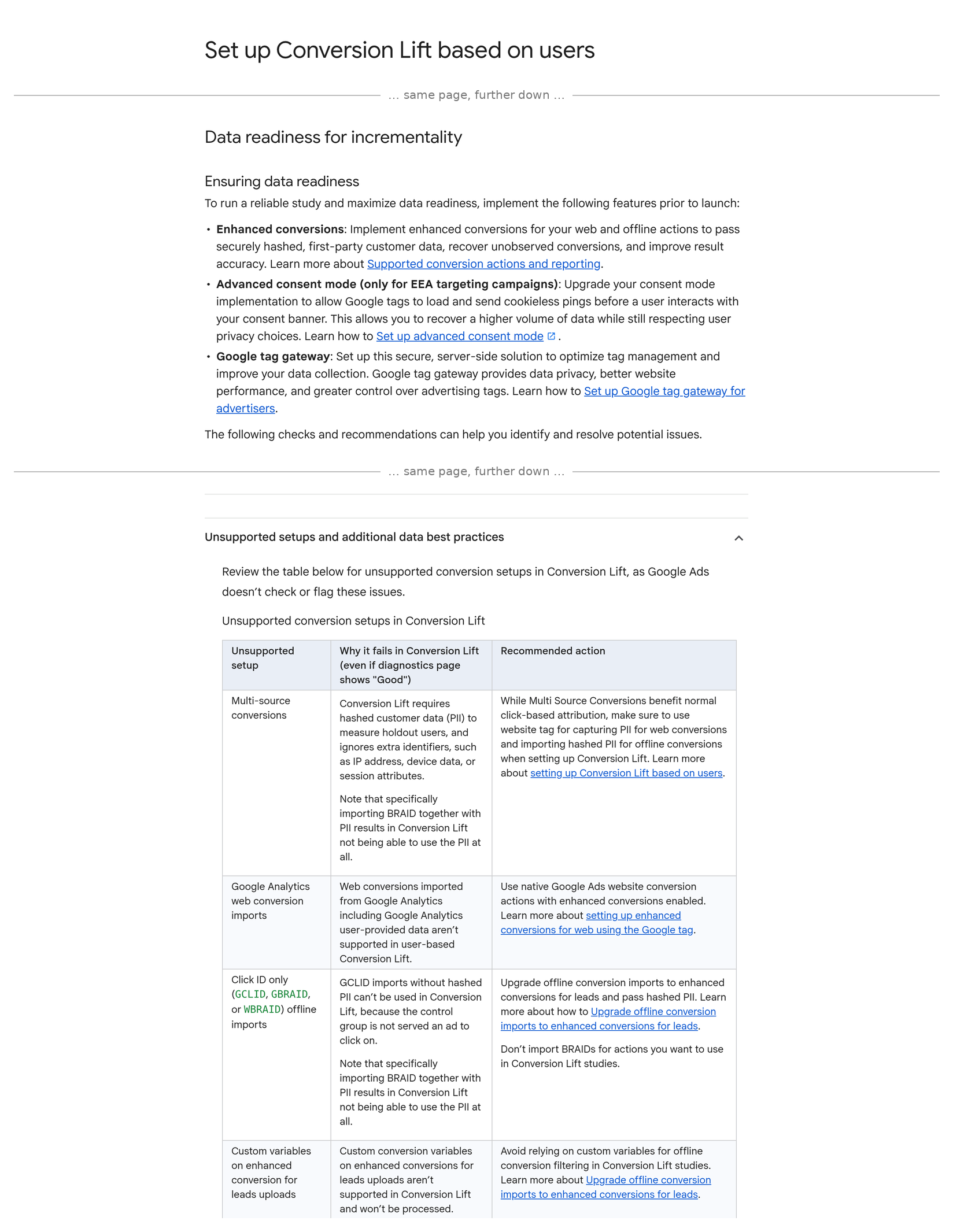
Google's help page "Set up Conversion Lift based on users" now has a section called "Data readiness for incrementality". It recommends three things before launch: enhanced conversions, advanced consent mode (for campaigns that target the EEA) and Google tag gateway.
Then it gets specific. A table headed "Unsupported setups" says, in Google's words, that "Google Ads doesn't check or flag these issues". It includes:
"Web conversions imported from Google Analytics including Google Analytics user-provided data aren't supported in user-based Conversion Lift."
In plain words, here is what the page now says:
- GA4 imports don't count. If Google Ads learns about your sales from GA4, the test can't use them. Google's fix is a native Google Ads conversion tag with enhanced conversions switched on.
- Click-ID-only uploads don't count either. If you upload orders or leads from your CRM with only a click ID (GCLID, GBRAID or WBRAID), the test can't use them. Google's reason: the people held back never saw an ad, so they never had a click ID to match.
- The test needs customer data. Enhanced conversions send hashed (scrambled) customer details such as email, so Google can match buyers to people who did or did not see ads. Google says phone-only setups "rarely reach" the matching levels needed, and you should always include email.
- Basic consent mode is not enough in the UK and EU. PPC Times reports the page says basic consent mode is insufficient when campaigns target the EEA, UK and DMA regions.
- Mixing web and app sales in one action breaks it. PPC Times quotes the page: "Conversion Lift drops all data when multiple sources are detected."
- Values must be real. The test uses the raw order value you send, not your Google Ads value rules. "Don't use a value" or a fixed value means no proper incremental revenue or iROAS.
- Give it time. Google wants 7 to 14 days of clean data from every selected conversion action before the test starts.
The entry ticket is not small either: Google lists at least 1,000 observed conversions and a minimum campaign budget of $5,000 USD.
Sources: Google Ads Help — Set up Conversion Lift based on users; The PPC Times, 15 November 2026; Search Engine Roundtable.
What it means, in plain terms
Many ecommerce shops send their purchases to Google Ads by importing them from GA4. It is quick to set up and it works for normal reporting. That is exactly the setup this test can't read.
Three things matter for your P&L:
- A test that can't see your sales still costs money. You pay for the campaign budget and you switch ads off for a share of people. If the test can't read the conversions, you get an unclear result, or no result, for real spend.
- A green screen is not a green light. Google's diagnostics page can say "Good" while the setup is on the unsupported list. Google's own table header says these setups fail "even if diagnostics page shows 'Good'".
- The fix helps more than the test. Moving to a native Google Ads tag with enhanced conversions, real order values and advanced consent mode also gives Google Ads better data to bid on every day, not just during a test.
Timing matters too. Most shops won't run a lift test across Black Friday. But if you want proof in January about what your peak budget really did, the setup work, plus the 7 to 14 days of clean data, has to start now.
The director checklist
- Ask how Google Ads counts your sales. One question to your agency: "Are our purchase conversions a Google Ads tag, or imported from GA4?" Get the answer for each conversion action you would test.
- If it is GA4, plan a native tag. Add a Google Ads purchase tag with enhanced conversions. Keep only one of them as the primary action, so the same sale is not counted twice.
- Check your CRM uploads. If you upload offline orders or leads, make sure they carry hashed customer data, not just a click ID.
- Send email every time. Enhanced conversions should include email, plus phone and address where you have them.
- Check consent mode is advanced, not basic. For UK and EU campaigns, your cookie banner should let Google tags load and send cookieless pings before a choice is made.
- Split web and app. If one conversion action takes both website and app sales, split it into two.
- Send real order values. Each purchase should carry its own value and a valid currency code.
- Wait 7 to 14 days, then test. Check Goals > Conversions > Summary > Diagnostics, then check Google's unsupported list by hand, because the system won't flag it.
Related reading: Attribution tells you who took the credit. A holdout tells you who earned it., Your order data can rescue lost conversions and Your cookie banner is now the only switch between GA4 and Google Ads.
Not sure how your sales reach Google Ads?
Run our free tracking scan at audit.taggurus.co.uk for a quick health score on your GA4 and Google tag setup.
Want a senior second opinion before you plan a lift test? Email info@taggurus.co.uk or book a meeting today to discuss.
#34/100 in our series “100 important things to know in the digital world”.
FAQ
Q: What is Conversion Lift?
A: It is Google Ads' own test of whether your ads cause extra sales. It hides your ads from a random group, then compares how much that group buys with people who saw the ads.
Q: Can we use GA4 conversions in a Conversion Lift test?
A: No. Google's help page says web conversions imported from Google Analytics "aren't supported in user-based Conversion Lift". Google recommends a native Google Ads conversion tag with enhanced conversions.
Q: Will Google Ads warn us if our setup won't work?
A: Not for everything. Google says Google Ads "doesn't check or flag" the unsupported setups, so check them by hand.
Q: Do we have to stop importing from GA4?
A: Not for normal reporting. But for a lift test you need a native Google Ads conversion action. If you run both, keep only one as primary so sales are not counted twice.
Q: How much does a test need?
A: Google lists at least 1,000 observed conversions and a minimum campaign budget of $5,000 USD, plus 7 to 14 days of clean data before launch.
Sources
- https://support.google.com/google-ads/answer/12005564?hl=en (Google Ads Help, “Set up Conversion Lift based on users”, read 16 November 2026: “Data readiness for incrementality” section; enhanced conversions, advanced consent mode “only for EEA targeting campaigns”, Google tag gateway; unsupported setups that “Google Ads doesn’t check or flag”; Google Analytics web conversion imports “aren’t supported in user-based Conversion Lift”; click-ID-only imports; raw event values; always include email; 7 to 14 days of pre-study data; 1,000 observed conversions and $5,000 USD minimum budget)
- https://ppctimes.com/news/google-ads-conversion-lift-data-readiness-checks (The PPC Times, Thomas Eccel, 15 November 2026: new section detected; basic consent mode insufficient for EEA, UK and DMA; “Conversion Lift drops all data when multiple sources are detected”)
- https://www.seroundtable.com/google-ads-conversion-lift-set-up-doc-update-42530.html (Search Engine Roundtable: “Google Ads Updates Conversion Lift Set Up Help Document”)
