
Google Analytics has started to suggest which of your website events should become Google Ads conversions.
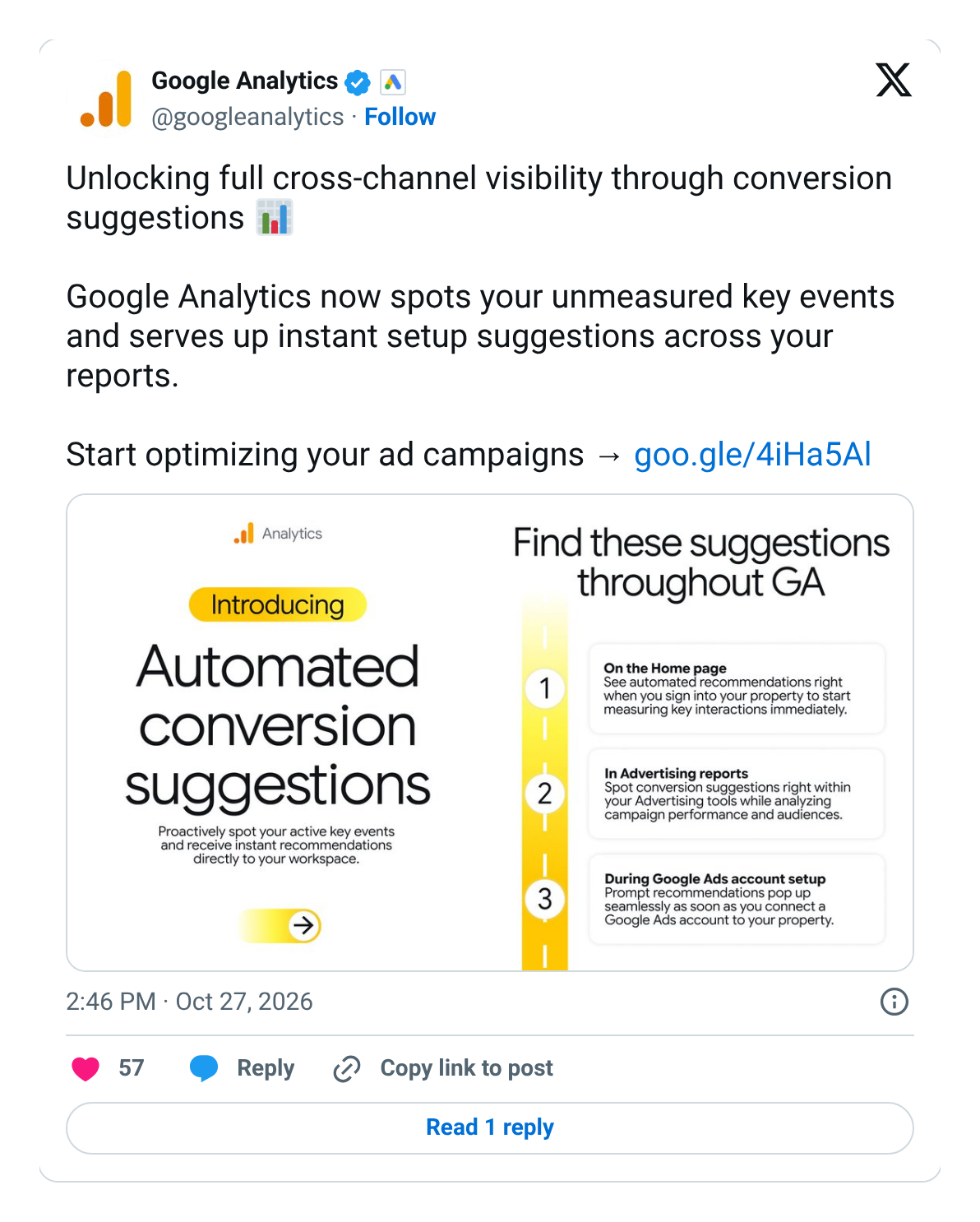
On 27 October, the official Google Analytics account on X announced automated conversion suggestions: “Google Analytics now spots your unmeasured key events and serves up instant setup suggestions across your reports.” The suggestions appear on the Home page, in the Advertising reports and when someone connects a Google Ads account.
It sounds like a helpful nudge. It is also a short path to changing what Google Ads spends your money chasing, a month before Black Friday.
For ecommerce and digital directors, the lesson is short: a suggested conversion is a question, not an answer. Decide what Google Ads should chase before anyone clicks accept.
What Google says
The post from Google Analytics on 27 October is headed “Unlocking full cross-channel visibility through conversion suggestions” and says:
“Google Analytics now spots your unmeasured key events and serves up instant setup suggestions across your reports.”
The graphic with the post says you can “Proactively spot your active key events and receive instant recommendations directly to your workspace”, and lists three places to find them: “On the Home page”, “In Advertising reports” and “During Google Ads account setup”, where “Prompt recommendations pop up seamlessly as soon as you connect a Google Ads account to your property.”
The post links to Google’s help page on creating conversions. It sets out the chain in three words: “Event → Key Event → Conversion”. A key event is an action you have marked as important in Google Analytics. A conversion is a key event you share with Google Ads so it can report and bid on it.
Google’s help pages add the rules that matter:
“Conversion actions created through the Google Analytics interface will be set as secondary. To use them for bidding, change their action optimization settings in Google Ads.”
Google says this is done “to prevent counting the same event twice for bidding.” It also says: “Events selected from the ‘Events’ section will be marked as key events in Google Analytics”, and “The value of each key event is measured in the Google Analytics property and will be automatically imported into Google Ads.”
Inside Google Ads, the setup guide now says: “If a predefined conversion suggestion is available, you can select Accept suggestions to create a new conversion action.” It adds a warning: “Correctly configuring your conversion actions as Primary (biddable) or Secondary (observation-only) is critical.”
Sources: Google Analytics on X, 27 October 2026; Analytics Help — Creating and managing conversions; Google Ads Help — Create conversions from Google Analytics events; Analytics Help — Create Google Ads conversions based on Google Analytics key events; Google Ads Help — Set up your web conversions (all checked 28 October 2026).
What it means, in plain terms
Google Ads learns from what you tell it counts as success. For a shop, that should be a paid order. Most shops also track smaller steps in Google Analytics: viewing a product, adding to basket, starting checkout, signing up.
Conversion suggestions look at those steps and offer to turn them into Google Ads conversions. Two settings then decide what happens:
- Secondary means watch only. Google says a secondary action is “for observation only”. It shows in the “All conversions” column, not in “Conversions”, and is not used for bidding. This is the default for conversions created from Google Analytics.
- Primary means bid on it. A primary action sits in the “Conversions” column and is “used for bidding”. One switch in Google Ads moves a conversion from watch-only to bid-on.
- One exception. Google says a secondary action is used for bidding if it is part of a custom goal. So “secondary” is only safe if nobody has built a custom goal around it.
The safe default is good news. The risk is what happens next, when a busy team sees a new conversion and decides to “use it”.
Why it matters for the P&L
- Google Ads chases what you reward. If “add to basket” becomes a primary conversion, Smart Bidding will find people who add to basket. Many of them never pay. Cost per conversion falls. Sales do not rise.
- Basket value can look like sales value. Ecommerce tags often send a value with “add to basket” and “begin checkout”. Google says the value of a key event is imported into Google Ads automatically. If those events count as conversions, ROAS can include money that never reached the till.
- The same sale can count twice. Many shops already send purchases to Google Ads through the Google Ads tag. If a Google Analytics purchase is also set to primary, one order can become two conversions. Bidding then thinks every sale is worth double and spends to match.
- Changes need time to settle. Google says Smart Bidding needs “a standard 7-14 day learning phase”. Black Friday is 27 November. A conversion change made in mid-November will still be settling during your biggest week.
- Your Google Analytics reports move too. Accepting a suggestion can mark new key events. Dashboards and board slides that show “key events” may jump overnight with no change in customers.
Brad Geddes, writing in Search Engine Land on 27 October, makes the same point from audits: “If a conversion is too easy for Google to achieve, such as page views, you’ll often see it become the most common conversion in your account.” On double counting: “If both conversions are marked as primary, the same conversion is counted twice.”
This links to two earlier notes. Where you record a sale decides how much of the story you see looked at the choice between the Google Ads tag and Google Analytics as the place a sale is counted. Your order data can rescue lost conversions showed why each sale must be counted once. Conversion suggestions make both questions easier to get wrong by accident.
What is not clear yet
- No release note yet. Google’s “What’s new in Google Analytics” page had no entry for conversion suggestions when we checked on 28 October. The news so far is the X post and the help pages it links to.
- Which events get suggested. Google does not list which key events it will suggest, or whether shopping steps like “add to basket” are included.
- Who sees it. Google does not say whether every property has it yet. Many recent Google Analytics features have rolled out property by property.
- Old data. Google says, for conversions created from Google Analytics, “Historical data from before the import won't be included.” Any new conversion starts from zero.
Sources: Google Ads Help — About primary and secondary conversion actions; Google Ads Help — Measure web key events from Google Analytics properties; Search Engine Land — 7 Google Ads conversion tracking mistakes to avoid (Brad Geddes, 27 October 2026); What’s new in Google Analytics (checked 28 October 2026).
Director checklist
- Name the one action that pays. For most shops that is a paid order. Write down which tool counts it for Google Ads: the Google Ads tag, Google Analytics, or your order data. Pick one source per sale.
- List what Google Ads bids on today. In Google Ads, go to Goals, then Summary. Note every primary conversion, where it comes from, its value and whether it counts “every” or “one”. Purchases should usually count every one.
- Treat every suggestion as a change request. Google says you need at least Marketer access in Google Analytics to create conversions for Google Ads. Agree who may accept a suggestion, and that nobody does it alone.
- Keep shopping steps as watch-only. Product views, add to basket and begin checkout are useful to watch. They should not be primary. If they carry a value, make sure it is not added to your sales value.
- Check custom goals and campaign goals. A secondary action inside a custom goal is used for bidding. Some campaigns, often Performance Max, use their own goals. Check both.
- Freeze conversion changes before peak. With a 7 to 14 day learning phase, set a cut-off around 10 November. After that, no new primary conversions until after Cyber Monday on 30 November, unless something is broken.
- Read change history every week. Google says conversion changes made in Google Analytics “will only appear in the ‘Change history’ page of Google Ads”. Ask for a weekly note of anything that changed.
- Judge Google Ads on your own orders. Put Google Ads purchases and purchase value next to paid orders from Shopify, Magento or your finance system, by day. If Google’s numbers jump and orders do not, check conversions first.
Questions to ask your team this week
- Have we seen conversion suggestions in Google Analytics yet, and has anyone accepted one?
- Which conversions does Google Ads bid on today, and where does each one come from?
- Is any purchase counted by both the Google Ads tag and Google Analytics as primary?
- Do any of our shopping steps send a value to Google Ads?
- Who can create or change conversions, and when is our freeze date before Black Friday?
Caveats
- Early days. The announcement is a short post on X. Google may add a release note or change how suggestions work.
- The default is cautious. Conversions created in Google Analytics start as secondary. The risk comes from later changes, not from the suggestion alone.
- Some suggestions will be right. If you sell in more than one way, such as phone orders, booked appointments or app sales, a suggestion may point to a real gap. Check it, then decide.
- Your books win. Google Ads and Google Analytics are estimates. Your order system is still the source of truth.
Final thoughts
#24/100 — A suggested conversion is a question, not an answer. Decide what Google Ads should chase before anyone clicks accept.
Suggestions save time. They do not know your margins. Pick the one action that pays, keep everything else as watch-only, and freeze changes before peak.
Not sure what your Google Analytics and Google Ads are really counting? Run our free GA4 and GTM tracking scan at https://audit.taggurus.co.uk/, email info@taggurus.co.uk, or book a meeting today to discuss.
FAQ
Q: What are conversion suggestions in Google Analytics?
A: A new prompt that spots key events you have not yet shared with Google Ads and offers to set them up as conversions. Google says they appear on the Home page, in Advertising reports and when you connect a Google Ads account.
Q: Will accepting a suggestion change our bidding?
A: Not on its own. Google says conversions created through Google Analytics are set as secondary, which is watch-only. Bidding changes if someone later makes it primary in Google Ads, or adds it to a custom goal.
Q: What is the difference between a key event and a conversion?
A: A key event is an action you mark as important in Google Analytics. A conversion is a key event you share with Google Ads so it can report and, if primary, bid on it.
Q: Should “add to basket” be a conversion?
A: As a secondary, watch-only action, it can be useful. As a primary action for an online shop, it usually pushes Google Ads towards cheap baskets rather than paid orders.
Q: Can this make our ROAS look better without more sales?
A: Yes. If a step like add to basket carries a value and counts as a conversion, or if one purchase is counted twice, Google Ads can report more value than you banked.
Q: Do we need to do anything if we never click accept?
A: Agree who is allowed to accept, check your current primary conversions once, and read change history weekly. That is enough for most teams.
Sources
- https://x.com/googleanalytics/status/2115092746557894763 (Google Analytics, official X account, 27 October 2026, 2:46pm UK time: “Google Analytics now spots your unmeasured key events and serves up instant setup suggestions across your reports”; graphic: “Introducing Automated conversion suggestions”, found “On the Home page”, “In Advertising reports”, “During Google Ads account setup”)
- https://support.google.com/analytics/answer/14710559 (Analytics Help, “Creating and managing conversions”, linked from the X post, checked 28 October 2026: “Event → Key Event → Conversion”; “Events selected from the ‘Events’ section will be marked as key events in Google Analytics”; at least Marketer access needed; not available for subproperties or roll-up properties)
- https://support.google.com/google-ads/answer/2375435 (Google Ads Help, “Create conversions from Google Analytics events in Google Ads”, checked 28 October 2026: “Conversion actions created through the Google Analytics interface will be set as secondary”; “Historical data from before the import won't be included”)
- https://support.google.com/analytics/answer/10632359 (Analytics Help, “Create Google Ads conversions based on Google Analytics key events”, checked 28 October 2026: set to secondary “to prevent counting the same event twice for bidding”)
- https://support.google.com/google-ads/answer/11461796 (Google Ads Help, “About primary and secondary conversion actions”, checked 28 October 2026: primary “used for bidding”; secondary “for observation only”, except inside a custom goal; “a standard 7-14 day learning phase”)
- https://support.google.com/google-ads/answer/9520128 (Google Ads Help, “Measure web key events from Google Analytics properties”, checked 28 October 2026: key event value “will be automatically imported into Google Ads”; changes made in Google Analytics appear in Google Ads “Change history”)
- https://support.google.com/google-ads/answer/16560108 (Google Ads Help, “Set up your web conversions”, checked 28 October 2026: “Accept suggestions”; Primary (biddable) vs Secondary (observation-only) “is critical”)
- https://searchengineland.com/google-ads-conversion-tracking-mistakes-498579 (Search Engine Land, Brad Geddes, 27 October 2026: “If a conversion is too easy for Google to achieve, such as page views, you’ll often see it become the most common conversion in your account”; “If both conversions are marked as primary, the same conversion is counted twice”)
- https://support.google.com/analytics/answer/9164320 (What’s new in Google Analytics, checked 28 October 2026: latest entry 5 October 2026; no entry yet for conversion suggestions)
