
When you cut a price for Black Friday, Google Shopping can show it as a sale: the new price, the old price struck through, and a small sale badge. Google calls this a sale price annotation. It is the quickest way for a shopper to see your discount next to a rival's price.
Google has now tightened the rule for Shopping ads in the UK and 11 other markets. Its Merchant Center help page says both the old price and the sale price must be in your product page's code (schema.org markup) and must match your product feed. The PPC Times' help page watcher spotted the change on 24 November 2026, three days before Black Friday.
Before, the page only said both prices should be shown on the product page. Now showing them to shoppers is not enough. Google's reader, the hidden code behind the page, has to say the same thing.
For ecommerce and digital directors, the lesson is short: your Black Friday sale only shows as a sale on Google Shopping if your product page code carries both prices. Check they match your feed before Friday, and don't rush big code changes in peak week.
What Google published
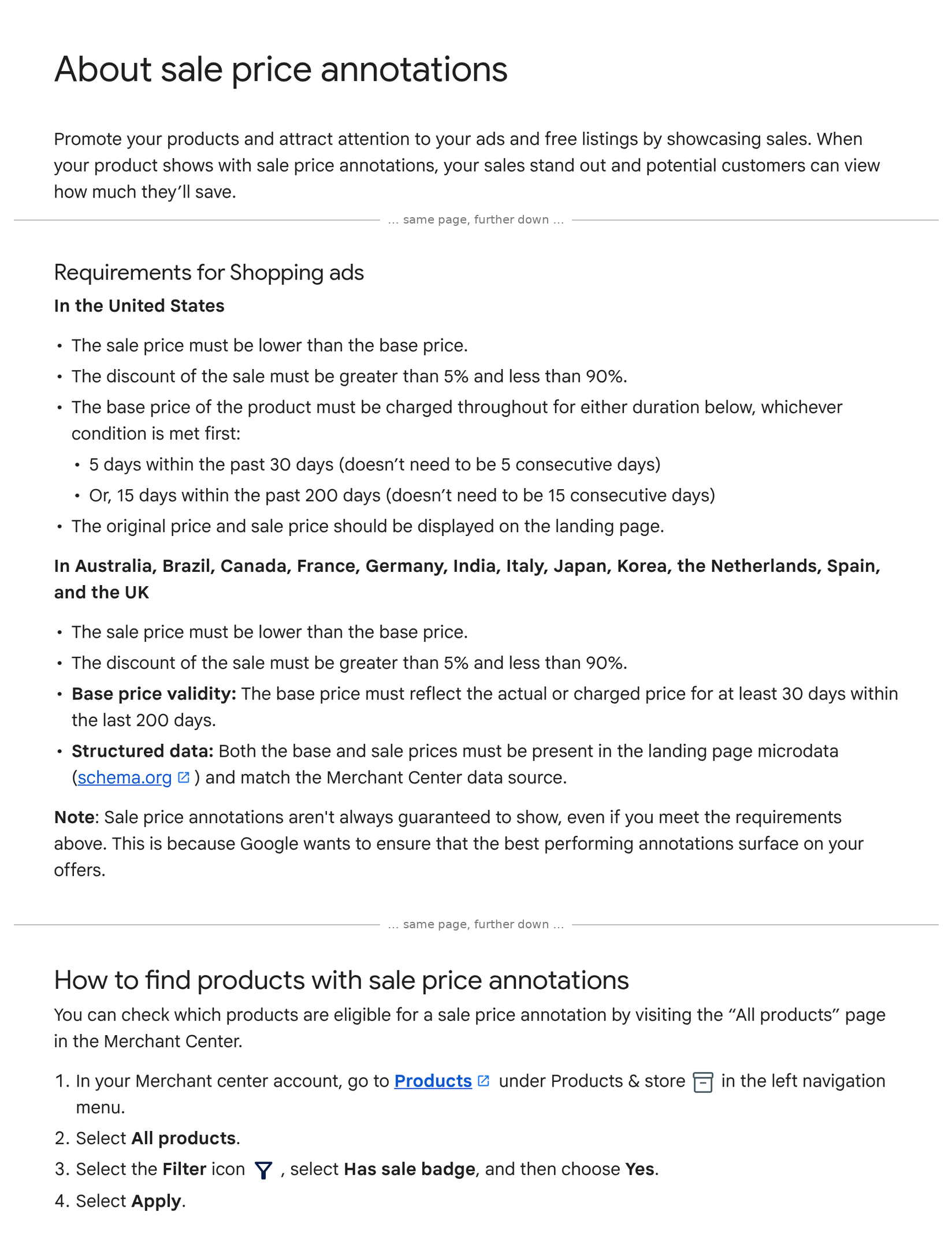
Google's "About sale price annotations" help page now lists this requirement for Shopping ads in Australia, Brazil, Canada, France, Germany, India, Italy, Japan, Korea, the Netherlands, Spain and the UK:
"Structured data: Both the base and sale prices must be present in the landing page microdata (schema.org) and match the Merchant Center data source."
In plain words, here is what the page says:
- It applies to the UK. The UK is on the list for Shopping ads. The US rules did not change.
- Two prices, in the code. The "base price" (the normal price) and the "sale price" must both be in the page's schema.org markup, not just on screen.
- They must match the feed. The prices in the code must match the price and sale price in your Merchant Center feed.
- The old rules still apply. The discount must be more than 5% and less than 90%, and the normal price must have been the real price for at least 30 days in the last 200.
- No guarantee. Google says sale price annotations "aren't always guaranteed to show, even if you meet the requirements above".
- You can check. In Merchant Center, the All products page has a "Has sale badge" filter.
What Google does not say: when the new rule starts, whether it is already being enforced, or how much the sale badge lifts clicks. Free listings and the US still use the older "displayed on the landing page" wording.
Sources: Google Merchant Center Help — About sale price annotations; The PPC Times, Thomas Eccel, 24 November 2026.
What it means, in plain terms
Think of every product page as having two layers. The top layer is what your customer sees: "£80, was £100". The bottom layer is code that machines read, called structured data. Google now checks the bottom layer for both prices. If the code says only "£80", Google may treat it as a normal price, not a sale.
Three things matter for your P&L:
- You can pay for a discount nobody sees as a discount. If the sale badge does not show, your £80 looks like any other £80 on the Shopping page. You still give away the margin, but you lose the strikethrough that makes shoppers click.
- Timing gaps break the match. If your feed switches to the sale price at midnight but your website switches at 9am, or the other way round, the prices do not match for those hours. Google says it "regularly validates the sale price on your website".
- Many sites only mark up one price. Shop themes and apps often put only the current price in the code. Google's own guide shows how to add the old price: as a second price marked "StrikethroughPrice". Your developer will know what that means.
One trap to avoid: adding this code through Google Tag Manager as a quick fix. Google's Search Central guide warns that for product markup, "dynamically-generated markup can make Shopping crawls less frequent and less reliable", which is an issue for fast-changing details like price. Prices that change on Black Friday are exactly that.
We wrote about another way Google can lose sight of your product pages in Google warns bot blocking can pull your products from Shopping.
The director checklist
- Ask one question today. "When a product is on sale, does our product page code show both the old and the new price?" If nobody knows, that is your answer.
- Test three sale products. Paste a product page into Google's Rich Results Test. Look under the product's offer for two prices, one marked as the strikethrough price.
- Compare with the feed. Check the same three products in Merchant Center. The price and sale price, and the currency, must match what the code says.
- Line up the switch-on times. Make sure the feed and the website start and end the sale at the same time, including any Cyber Monday changes.
- Watch the sale badge filter. In Merchant Center, go to Products, All products, then filter by "Has sale badge". Note the count before and after your sale starts. A drop could point to a code problem.
- Fix small, then freeze. A setting in your shop platform or feed app that you can test on a few products this week is fine. Rewriting theme code, or adding markup through Tag Manager, should wait until after Cyber Monday on 30 November.
Related reading: Google Shopping ads can now show "100+ sold" — if your tracking sends the basket.
Not sure what your product pages tell Google?
Run our free tracking scan at audit.taggurus.co.uk for a quick health score on your GA4 and Google Ads tracking.
Want a senior second opinion before Black Friday? Email info@taggurus.co.uk or book a meeting today to discuss.
#41/100 in our series “100 important things to know in the digital world”.
FAQ
Q: What is a sale price annotation?
A: The way Google Shopping shows a sale: the new price, the old price struck through, and a sale badge. It shows on Shopping ads, free listings and the Shopping tab when your feed has a sale price and you meet Google's rules.
Q: Does this apply to UK Shopping ads?
A: Yes. Google's help page lists the UK among the 12 markets where both prices must be in the page's schema.org markup and match the Merchant Center feed.
Q: When does the rule start?
A: Google's page does not give a date. The PPC Times spotted the new wording on 24 November 2026. Treat it as live and check your pages now.
Q: Can we add the markup with Google Tag Manager?
A: It is possible, but Google warns that dynamically generated product markup can make Shopping crawls less frequent and less reliable. For prices that change during a sale, markup in the page itself is the safer choice.
Q: Should we change our site before Black Friday?
A: Check now, it costs nothing. Make only small, tested fixes this week, such as a setting in your shop platform or feed app. Bigger code changes are safer after Cyber Monday.
Sources
- https://support.google.com/merchants/answer/9017019?hl=en (Google Merchant Center Help, “About sale price annotations”, read 25 November 2026: Shopping ads requirements “In Australia, Brazil, Canada, France, Germany, India, Italy, Japan, Korea, the Netherlands, Spain, and the UK”; “Structured data: Both the base and sale prices must be present in the landing page microdata (schema.org) and match the Merchant Center data source”; “Base price validity: The base price must reflect the actual or charged price for at least 30 days within the last 200 days”; discount “greater than 5% and less than 90%”; “Sale price annotations aren't always guaranteed to show”; “Google regularly validates the sale price on your website”; “Has sale badge” filter on the All products page)
- https://ppctimes.com/news/merchant-center-sale-price-annotations-structured-data (The PPC Times, Thomas Eccel, 24 November 2026: help page watcher detected the change on 24 November 2026; the line replaced said the original and sale price “should be displayed on the landing page”; the page “does not give a date for when the requirement applies”; US Shopping ads and free listings unchanged)
- https://support.google.com/merchants/answer/14232690?hl=en (Google Merchant Center Help, “About sale price and promotions (for Shopify users)”, read 25 November 2026: carries the same structured data requirement for the same 12 markets)
- https://support.google.com/merchants/answer/6386198?hl=en (Google Merchant Center Help, “Supported structured data attributes and values”: when sale_price is specified, price must be given in a priceSpecification with priceType “StrikethroughPrice”; “Structured data must match the values that are shown to the customer”; “Google recommends the use of JSON-LD for your structured data”)
- https://developers.google.com/search/docs/appearance/structured-data/generate-structured-data-with-javascript (Google Search Central, “Generate structured data with JavaScript”: “dynamically-generated markup can make Shopping crawls less frequent and less reliable, which can be an issue for fast-changing content like product availability and price”)
