
Most retailers tell Google Ads how much return they want from every pound they spend. Google calls this Target ROAS (return on ad spend). A 500% target means Google aims for £5 of sales for every £1 of ads.
For a short sale, you may be happy to accept less return to win more orders. Google has a setting for this called Promotion Mode. It lowers your target for a few days, can add extra daily budget, and then puts everything back by itself when the sale ends.
Until now, Google's help page listed Promotion Mode for Search and Performance Max campaigns. The page now lists standard Shopping campaigns too. The PPC Times spotted the change on 23 November 2026, four days before Black Friday.
For ecommerce and digital directors, the lesson is short: Google Ads can now lower your Shopping target for a short sale and put it back by itself. It bids on the sales your tracking reports, so check those numbers and agree a margin limit before you switch it on.
What Google published
Google's "About Promotion Mode" help page describes the setting like this:
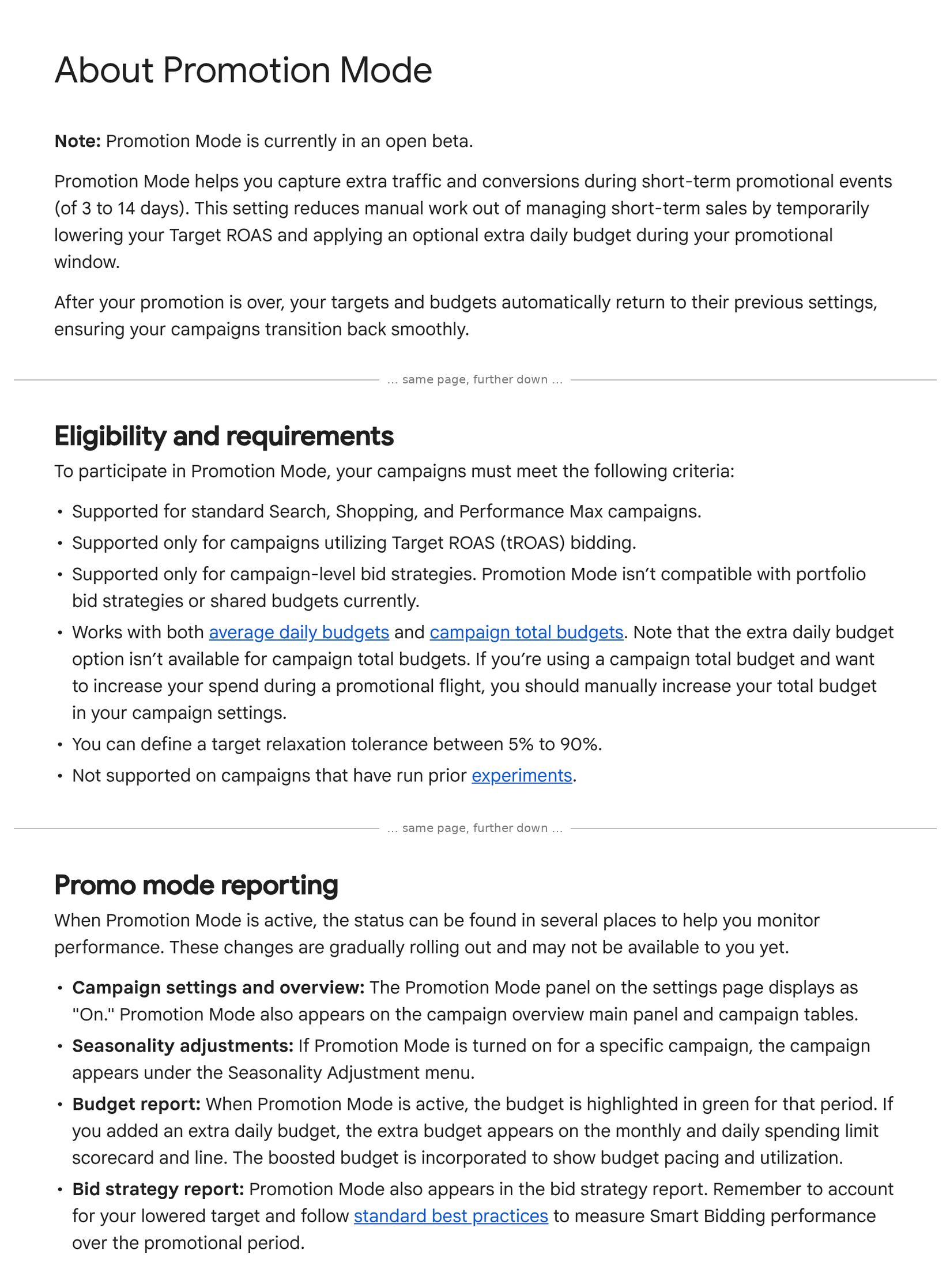
"Promotion Mode helps you capture extra traffic and conversions during short-term promotional events (of 3 to 14 days). This setting reduces manual work out of managing short-term sales by temporarily lowering your Target ROAS and applying an optional extra daily budget during your promotional window."
In plain words, here is what the page says:
- Shopping is now on the list. It is "Supported for standard Search, Shopping, and Performance Max campaigns."
- It is still a beta. Google says Promotion Mode "is currently in an open beta", so not every account may see it.
- Only some campaigns qualify. The campaign must bid on Target ROAS with its own bid strategy. Shared budgets, portfolio strategies and campaigns that have run past experiments are not supported.
- You choose how far to drop. You set a "tolerance" between 5% and 90%. In Google's example, a 20% tolerance takes a 500% target down to 400%.
- Drops can stack. If the campaign already uses Smart Bidding Exploration, the two tolerances are added together: 20% plus 20% makes 40%.
- It ends on its own. After 3 to 14 days, the target and budget go back to what they were.
What Google does not say: when Shopping support started, or how much extra profit the setting brings. Its new reporting is "gradually rolling out and may not be available to you yet."
Sources: Google Ads Help — About Promotion Mode; The PPC Times, Thomas Eccel, 23 November 2026.
What it means, in plain terms
Promotion Mode is a "spend more, earn less per pound" button with a timer. That can be the right call on Black Friday, when shoppers are ready to buy. But the setting is only as good as the numbers it bids on.
Three things matter for your P&L:
- Google bids on the sales your tracking reports, not your bank balance. If your purchase tag counts VAT, delivery or the same order twice, Google already thinks your return is higher than it is. Lower the target on top of that and you may be paying for orders at a loss.
- The drop can be bigger than you think. A 20% Promotion Mode drop on a campaign that already uses a 20% Exploration drop is a 40% drop. Agree the real number with your finance lead first.
- It is not the same as a seasonality adjustment. Google says a seasonality adjustment keeps aiming for your original target, while Promotion Mode "will aim to achieve the lowered ROAS target". One tells Google to expect more sales. The other tells Google you will accept less return.
One more thing: during an active promotion, you cannot change the normal target or budget outside the Promotion Mode panel, and you cannot change the start date. Set it up carefully the first time.
If you want Google to aim for margin rather than sales, read Google Ads can bid on profit, not just sales.
The director checklist
- Check the sales number first. Compare Google Ads purchase value for one recent week with your own orders for the same week. If Google's figure is much higher, fix that before you lower any target.
- Agree a floor. Decide the lowest return you can live with after discounts and delivery costs. Turn that into a tolerance, and add any Exploration tolerance already in place.
- Use campaigns that already run. Google advises building new campaigns at least 48 hours before the sale and giving existing ones at least one full conversion cycle first. For a Friday start, that points to campaigns you already have.
- Match the dates to your sale. Black Friday to Cyber Monday (27 to 30 November) fits the 3 to 14 day window. Remember the start date cannot be changed once the promotion is live.
- Watch tracking every day of the sale. If your purchase tag breaks, Google keeps bidding on bad data. Google's data exclusions tool lets you tell Smart Bidding about a "conversion data outage". Apply it as soon as you spot the problem.
- Judge it on your own orders. Google's own report says to "account for your lowered target". After the sale, compare extra orders and margin against what you spent, and allow 1 to 2 conversion cycles before judging normal performance again.
Related reading: Your Black Friday sale price on Google Shopping now depends on your page code.
Not sure your Google Ads sales numbers are right?
Run our free tracking scan at audit.taggurus.co.uk for a quick health score on your GA4 and Google Ads tracking.
Want a senior second opinion before Black Friday? Email info@taggurus.co.uk or book a meeting today to discuss.
#42/100 in our series “100 important things to know in the digital world”.
FAQ
Q: What is Google Ads Promotion Mode?
A: A setting that lowers a campaign's Target ROAS for a short sale of 3 to 14 days, with optional extra daily budget. When the sale ends, the target and budget go back to what they were.
Q: Does it work on Shopping campaigns?
A: Google's help page now says it is supported for standard Search, Shopping and Performance Max campaigns. It is an open beta, so it may not show in every account.
Q: Is it the same as a seasonality adjustment?
A: No. Google says a seasonality adjustment keeps aiming for your original target. Promotion Mode aims for the lowered target, so you are choosing to accept less return per pound.
Q: Can we set it up for Black Friday now?
A: For existing campaigns that meet the rules, yes, if the panel shows in your account. Google advises building new campaigns at least 48 hours before the promotion starts.
Q: What if our tracking breaks during the sale?
A: Fix it fast and use Google Ads data exclusions for the affected dates, so Smart Bidding does not learn from the bad data.
Sources
- https://support.google.com/google-ads/answer/18111661?hl=en (Google Ads Help, “About Promotion Mode”, read 26 November 2026: “Promotion Mode is currently in an open beta”; “short-term promotional events (of 3 to 14 days)”; “temporarily lowering your Target ROAS and applying an optional extra daily budget”; “Supported for standard Search, Shopping, and Performance Max campaigns”; Target ROAS and campaign-level bid strategies only; not compatible with portfolio bid strategies or shared budgets; tolerance “between 5% to 90%”; “Not supported on campaigns that have run prior experiments”; Promotion Mode and Exploration tolerances “are added together”; new campaigns “at least 48 hours prior”; existing campaigns “at least one full conversion cycle”; can’t change the start date during an active promotion; “allow 1 to 2 conversion cycles”; Promo mode reporting “gradually rolling out”; bid strategy report: “Remember to account for your lowered target”; seasonality adjustments keep the original target while Promotion Mode “will aim to achieve the lowered ROAS target”)
- https://ppctimes.com/news/google-ads-promotion-mode-shopping-campaigns (The PPC Times, Thomas Eccel, 23 November 2026, updated 25 November 2026: help page version detected 23 November 2026 adds Shopping; earlier version said “Retail will be available in November 2026”; Exploration in Performance Max now covers Shopping inventory; new Promo mode reporting section; no date given for when Shopping support began)
- https://support.google.com/google-ads/answer/10276486?hl=en (Google Ads Help, “Use data exclusions for conversion data outages”: data exclusions help reduce the impact of conversion tracking issues on Smart Bidding; “Apply data exclusions as quickly as possible”)
