
On 3 November 2026 Google released version 1.0 of its Google Analytics MCP server and took it out of “experimental” status. Three days later, on 6 November, version 1.1 followed. In plain words, this is Google’s own connector that lets AI assistants such as Claude, Gemini or Cursor read your GA4 data and answer questions about it in a chat.
The analytics community has been talking about it all week. Thomas Eccel wrote it up for PPC Times on 6 November (“Google Analytics MCP server reaches version 1.0 and leaves experimental status”), Adriaan Dekker shared it the same day (“You can now connect your AI assistant directly to your GA4 data”), and Spanish startup site El Ecosistema Startup covered it again on 11 November.
For ecommerce and digital directors, the lesson is short: an AI assistant can now read your GA4 in a chat. Start it read-only, check its answers against your own numbers, and decide who may change what Google Ads bids on.
What Google released
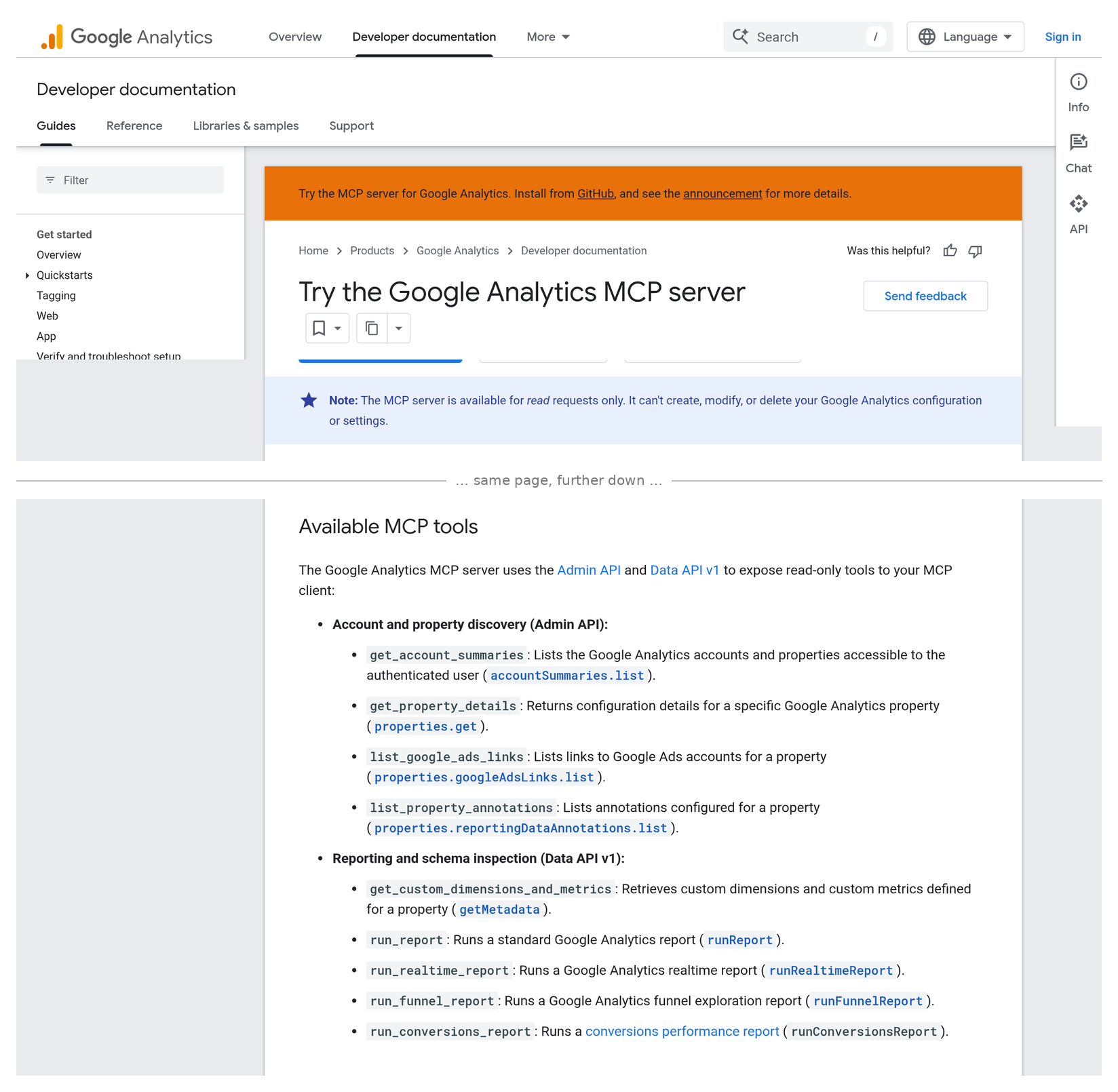
Google’s developer page, “Try the Google Analytics MCP server” (last updated 10 November 2026), says the server “lets you connect your Google Analytics data to large language models (LLMs) and AI agents, such as Gemini. You can use the MCP server to query reports in natural language, inspect property configurations, and build custom analytics agents.”
The same page carries this note:
“The MCP server is available for read requests only. It can't create, modify, or delete your Google Analytics configuration or settings.”
In plain words:
- What “MCP” means. MCP (Model Context Protocol) is a standard plug that lets an AI tool talk to another system. Google’s plug connects AI tools to GA4.
- What it can see. Your reports, funnels, real-time data, your key events (what GA4 counts as a conversion), your custom settings, and which Google Ads accounts are linked. One tool, the conversions report, covers ad costs, conversions, ROAS and attribution.
- What changed in 1.0. Each person can now sign in with their own Google account on a shared, team-hosted server, instead of everyone sharing one login. That makes it easier for agencies and in-house teams to roll it out.
- The part to watch. Google’s page says read-only. But the 1.1 release notes on GitHub (6 November) add “opt-in Admin API write tools (custom dimensions, key events)”. The project’s own read-me says creating a key event needs a special “allow write” switch, edit permission and the Marketer or Editor role. So it is read-only by default, not read-only forever.
- It is not one click. Google lists Python, a Google Cloud project, both Analytics APIs switched on, and at least Viewer access on the property.
Sources: Google for Developers — Try the Google Analytics MCP server; GitHub — google-analytics-mcp releases; PPC Times, 6 November 2026.
What it means, in plain terms
This is useful. Asking “what were our top-selling products yesterday?” in a chat is faster than building a report. Google’s own sample prompts include exactly that, plus “help me create a data-driven marketing plan”.
But three things matter for your P&L:
- An AI answer is only as good as your tracking. If GA4 misses 15% of orders, the AI will confidently give you numbers that miss 15% of orders. It does not know your GA4 and your shop platform disagree.
- AI tools can get the question wrong. Pick the wrong date range, the wrong channel or the wrong revenue figure, and you get a neat answer to the wrong question. PPC Times puts it simply: the server “is a way to ask questions, not a replacement for checking the numbers.”
- Write access touches money. In GA4, key events are what many shops send to Google Ads to bid on. If an AI agent can create or change a key event, it can change what your ad budget chases. That decision should sit with a person, not a chat.
There is also a data question. Connecting GA4 to an outside AI tool means your sales and customer behaviour data is passed to that tool. PPC Times advises reviewing your client agreements and company policy first.
The director checklist
- Ask who has already connected GA4 to an AI tool. Agencies, analysts and developers may already be testing it. You want a list, not a surprise.
- Make read-only the rule. Google’s setup asks for the read-only scope and at least Viewer access. Keep it that way unless there is a clear, written reason.
- Give AI tools their own access, not someone’s admin login. Use a Viewer account or a named sign-in per person, so you can see and remove access later.
- Keep key events and Google Ads links human-only. No AI agent should create key events or change what Google Ads imports, especially in the run-up to Black Friday.
- Test it on numbers you already know. Ask the AI for last month’s revenue, orders and top products, then compare with GA4 and your shop platform. If it is off, find out why before anyone uses it in a meeting.
- Check your data rules. Which AI tool, where the data goes, and whether your contracts and privacy policy allow it. Bring in your DPO if you have one.
- Write the rule down. One short page: who can connect, read-only by default, what needs approval, and who reviews access each quarter.
Related reading: GA4’s new Data Manager can count a sale twice, GA4 conversion suggestions are a question, not an answer and AI agent traffic at checkout.
Not sure what your GA4 is really telling you?
Before an AI tool reads your GA4, make sure GA4 is worth reading. Run our free tracking scan at audit.taggurus.co.uk for a quick health score.
Want a senior second opinion? Email info@taggurus.co.uk or book a meeting today to discuss.
#33/100 in our series “100 important things to know in the digital world”.
FAQ
Q: What is the Google Analytics MCP server?
A: It is Google’s official connector that lets AI assistants read your GA4 data and answer questions in plain language. Version 1.0 came out on 3 November 2026.
Q: Can it change our GA4 settings?
A: Google’s developer page says it is “available for read requests only”. The 1.1 release (6 November) adds optional tools to create custom dimensions and key events, but only if someone switches on write access and has the right GA4 role.
Q: Which AI tools work with it?
A: Google’s page gives set-up steps for Antigravity, Claude Desktop, Claude Code and Cursor. It is open source, so other tools that support MCP can connect too.
Q: Should we stop our team using it?
A: No. It can save time. Set the rules first: read-only, named access, test against known numbers, and no AI changes to key events or Google Ads links.
Q: Is our data safe?
A: That depends on the AI tool you connect, not just Google’s connector. Check where the AI tool stores data and whether your contracts and privacy policy allow it.
Sources
- https://developers.google.com/analytics/devguides/MCP (Google for Developers, “Try the Google Analytics MCP server”, last updated 10 November 2026: connects GA data to LLMs and AI agents; “available for read requests only”; read-only scope; Viewer role; tools include run_conversions_report and list_google_ads_links; set-up for Antigravity, Claude Desktop, Claude Code, Cursor)
- https://github.com/googleanalytics/google-analytics-mcp/releases (GitHub releases: v1.0.0 on 3 November 2026 “graduate from experimental”, multi-tenant HTTP transport and OAuth 2.1; v1.1.0 on 6 November 2026 “add opt-in Admin API write tools (custom dimensions, key events)”)
- https://github.com/googleanalytics/google-analytics-mcp (project read-me: create_key_event requires the --allow-write flag, the analytics.edit scope and the Marketer or Editor role)
- https://ppctimes.com/news/google-analytics-mcp-server-1-0 (PPC Times, Thomas Eccel, 6 November 2026: leaves experimental status; per-user sign-in; “a way to ask questions, not a replacement for checking the numbers”; start read-only; review client agreements)
- https://adriaan-dekker.nl/you-can-now-connect-your-ai-assistant-directly-to-your-ga4-data/ (Adriaan Dekker, 6 November 2026: “You can now connect your AI assistant directly to your GA4 data.”)
