
Google has published a UCP Analytics dashboard in Merchant Center for checkout that happens in AI Mode and Gemini. The developer guide was last updated on 27 October 2026. Industry writers, including Ankit Minocha at Atomz on 4 November 2026, are already telling teams where those sales show up.
For ecommerce and digital directors, the lesson is short: AI checkout sales do not live in one report. Check Merchant Center, your shop platform and your own analytics before you trust the number.
This is not the same problem as the GA4 tracking gap on AI checkout, Universal Cart measurement, or AI agent traffic reaching checkout. Those earlier notes asked whether your tags fire. Today asks a different question: where the sales number lives, across three places, and what each place can and cannot see.
What Google documents
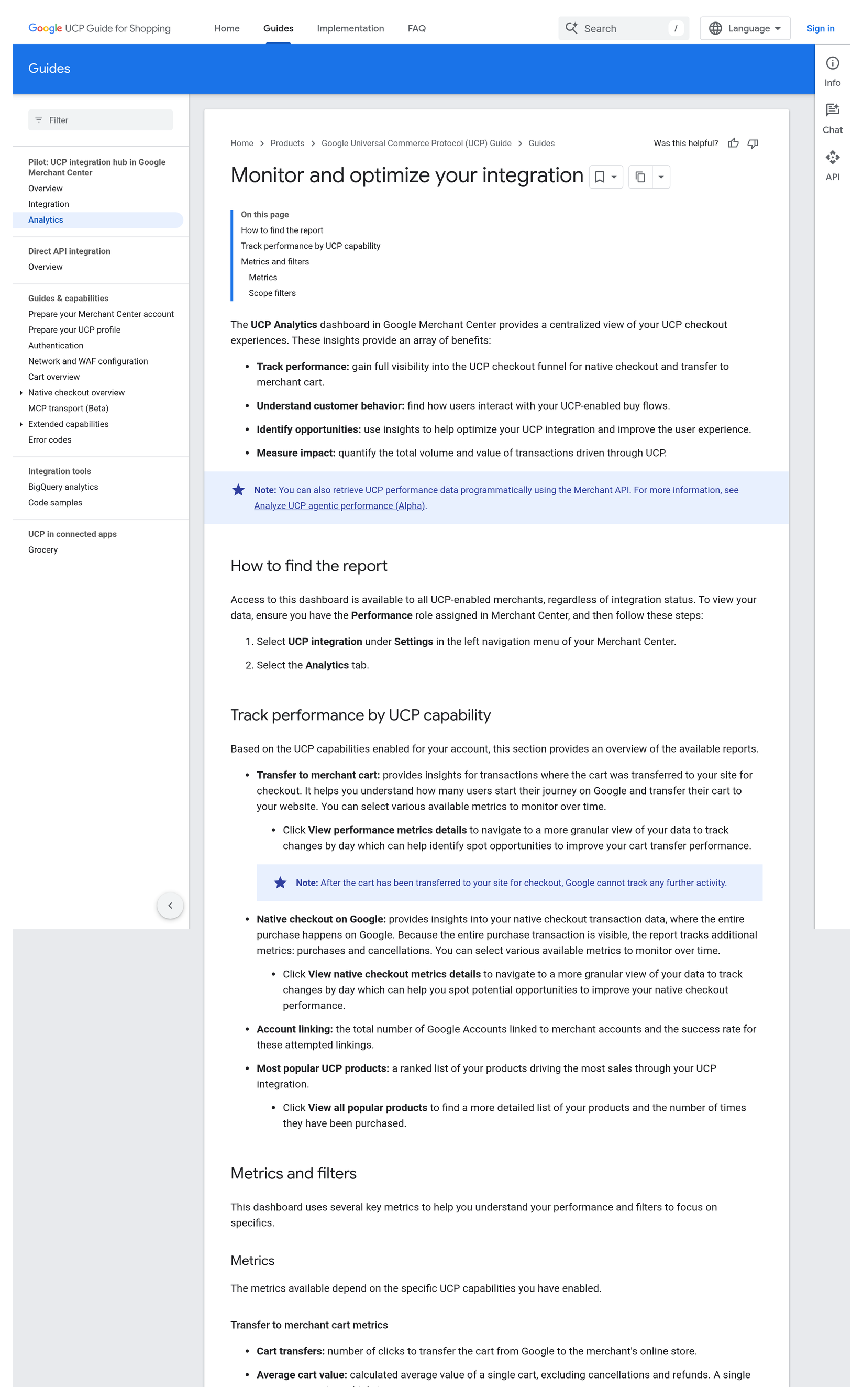
Google’s Universal Commerce Protocol (UCP) guide, Monitor and optimize your integration, describes a dashboard in Google Merchant Center. It gives a central view of UCP checkout experiences — both native checkout on Google and transfer to merchant cart.
Access is available to all UCP-enabled merchants, regardless of integration status. You need the Performance role in Merchant Center. The path Google documents is:
- Select UCP integration under Settings in the left navigation of Merchant Center.
- Select the Analytics tab.
Based on the UCP capabilities enabled for the account, Google then shows:
- Transfer to merchant cart — cart transfers, average cart value, average product count and average product value. Google’s own note is clear: after the cart has been transferred to your site for checkout, Google cannot track any further activity.
- Native checkout on Google — Buy button clicks, purchase count, average order value, average product count and value, and cancellations. Because the whole purchase happens on Google, the report can track purchases and cancellations.
- Account linking — accounts linked and account linking rate.
- Most popular UCP products — a ranked list of products driving sales through UCP.
Filters include time period and location. Google also points merchants to a Merchant API alpha for programmatic pull: UcpAgenticPerformanceView and UcpAgenticProductPerformanceView, covering AI Mode in Search and Gemini. A date filter is required. The product view reports Buy button clicks, not purchases. Alpha means the shape can change.
Sources: Google for Developers — Monitor and optimize your integration (UCP Analytics) (last updated 27 October 2026); Analyze UCP agentic performance (Alpha) (last updated 26 October 2026); How to start UCP integration in Merchant Center (UCP hub gradually rolling out in the United States, with Australia and Canada early next year).
What it means, in plain terms
- There are two Google checkout paths. Native checkout finishes on Google. Cart transfer sends the shopper (and cart) to your site. Each path has different metrics — and different blind spots.
- Merchant Center sees Google’s side of the funnel. Cart transfers stop at the hand-off. Native purchases and cancellations are visible to Google because the order completes there.
- Your shop platform sees the order when payment lands in your admin. For Shopify, Atomz notes that native/direct checkout still creates an order in Shopify admin even when the site never loads. Browser pixels on your site therefore miss that sale. Shopify’s Sales channels → Agentic view is where Atomz points directors for channel-level sales.
- Your own analytics (GA4 and pixels) only see visits that actually load your site with a usable source, medium or referrer. Atomz’s test found ChatGPT outbound links carried
utm_source=chatgpt.com; Gemini links were often untagged, and the Gemini iPhone app sent no referrer so those visits landed in Direct. - Three reports, three partial truths. Adding Merchant Center + Shopify Agentic + GA4 as if they were three separate piles of revenue will double-count. Treat them as complementary views, not a sum.
- UK directors may not see the tab yet. Google says the UCP integration hub is gradually rolling out in the United States, with Australia and Canada early next year. Knowing the reporting model still matters before the tab appears in your account.
This sits next to two earlier notes. AI checkout can complete without your site loading — and GA4 will never see it covered the browser-pixel gap. AI agent traffic is already reaching checkout — check Clarity before Black Friday covered agent sessions on your own pages. Today is about reconciling the sales number across Merchant Center, your shop and your analytics.
Why it matters for the P&L
- Conversion rate can look “wrong” for the wrong reason. If AI Mode or Gemini closes orders off-site, GA4 never saw the purchase. Boards that only read the GA4 conversion rate will understate revenue from those channels — or chase a “drop” that is really a measurement gap.
- Paid and organic AI traffic will be argued in the wrong meeting unless someone owns the three-place check. Marketing will defend Ads ROAS. Product will defend the store conversion rate. Finance will ask why Shopify and Merchant Center disagree. One reconciliation pack avoids three conflicting stories.
- Native checkout sales are invisible to on-site pixels. If the shopper never loads your site, Meta, TikTok and LinkedIn browser pixels cannot fire a purchase event for that order. Your shop platform (and Merchant Center for Google’s native path) holds the truth for those sales.
- Cart-transfer sales look incomplete in Merchant Center. Google stops at the transfer. Revenue after that lives in your shop and, if tags fire, in your analytics. Do not treat “cart transfers” as completed revenue.
- Black Friday and peak trading amplify the gap. More AI-assisted journeys mean more orders that never touch your thank-you page. A weekly three-place check is cheaper than a board meeting about “missing” sales.
Director checklist (adapt of the industry checks)
Hand these to your analytics or ecommerce lead. Adapt them to your stack — Shopify is the example Atomz used; Magento, BigCommerce and headless setups need the equivalent admin views.
- Open Merchant Center → Settings → UCP integration → Analytics (Performance role required). If the tab is not there yet, note the roll-out caveat for your region and diary a re-check. If it is there, export native checkout purchases and cart transfers for the last 30 days, filtered by location if you sell in more than one market.
- Open your shop platform’s agentic / AI sales channel view. On Shopify: Sales channels → Agentic, last 30 days, open each AI channel. Note which channels show orders versus sessions only. Confirm native/direct checkout orders appear in admin even when the site never loaded.
- Open GA4 (and any other analytics). Look for
utm_source=chatgpt.comand forgemini.google.comas a referrer. Check Direct for the same window — Atomz and search marketers reported untagged Gemini links and missing referrers from the iPhone app. Do not add this number to Merchant Center purchases. - Reconcile, do not sum. Build a one-page pack: Merchant Center native purchases + cart transfers (labelled as hand-offs, not revenue); shop-platform agentic orders; GA4/on-site purchases attributed to AI sources. Flag overlaps. Never present the three totals as additive revenue.
- Check product truth. Use Merchant Center’s most popular UCP products (and the API product view for Buy clicks if you pull data) against your own bestsellers. Gaps may mean feed, availability or checkout-path issues — not just attribution.
- Align the board story. One sentence: “AI checkout sales sit in Merchant Center, our shop admin and our analytics — each sees a different slice. We reconcile weekly; we do not double-count.”
Questions to ask your team this week
- Do we have the Performance role on Merchant Center, and can anyone on the commercial team open the UCP Analytics tab today?
- Are we live for native checkout on Google, transfer to merchant cart, or both — and does our Merchant Center report match that?
- Where do Shopify (or our platform) Agentic / AI channel orders appear in last month’s P&L pack?
- Which AI sources show up in GA4 with UTMs or referrers — and how much AI-assisted traffic is landing in Direct?
- Who owns the weekly reconciliation so marketing, product and finance read one number?
Caveats
- We are not claiming every UK Merchant Center already shows the UCP Analytics tab. Google’s integration hub note says the hub is gradually rolling out in the US, with Australia and Canada early next year. UK visibility may lag. The reporting model is still worth knowing.
- Performance role is required to view the dashboard, per Google’s guide.
- After cart transfer, Google cannot track further activity — that is Google’s own wording. Do not treat cart transfers as completed sales.
- Native checkout purchases are invisible to GA4 and browser pixels on your site when the shopper never loads your pages.
- Do not double-count Shopify Agentic + Merchant Center + GA4. They overlap by design.
- The Merchant API UCP performance reports are alpha and can change. Useful for dashboards; not a frozen schema.
- Atomz’s UTM and referrer findings are from one tester’s run (ChatGPT tagged; Gemini often untagged; Muse via Meta link +
fbclid; Shopify Catalog UTMs). Re-test on your own links before you change attribution rules.
Final thoughts
#29/100 — AI checkout sales do not live in one report. Check Merchant Center, your shop platform and your own analytics before you trust the number.
Merchant Center UCP Analytics is a real, documented place for Google’s AI Mode and Gemini checkout funnel. It is not the whole story. Your shop admin holds orders that never touched your site. Your analytics holds the visits that did. Directors who check all three — and refuse to add them up blindly — will trust the number. Everyone else will argue about a gap that is really three different windows on the same trade.
Not sure how AI checkout shows up in your Merchant Center, shop admin and GA4 today? Run our free GA4 and GTM tracking scan at <https: data-preserve-html-node="true"//audit.taggurus.co.uk/>, email info@taggurus.co.uk, or book a meeting today to discuss.
FAQ
Q: Where is the UCP Analytics dashboard?
A: In Merchant Center under Settings → UCP integration → Analytics, per Google’s developer guide. You need the Performance role.
Q: What are the two Google funnels?
A: Transfer to merchant cart (Google stops at the hand-off) and Native checkout on Google (Buy clicks, purchases, AOV, cancellations).
Q: Will GA4 see native checkout on Google?
A: Not via your site’s browser pixels, if the shopper never loads your pages. The order can still appear in your shop admin and in Merchant Center’s native checkout metrics.
Q: Can I add Merchant Center + Shopify + GA4 to get total AI sales?
A: No. The three views overlap. Reconcile them; do not sum them as separate revenue.
Q: Is the Merchant API report ready for production dashboards?
A: It is documented as alpha (experimental) and subject to change. Use it with that caveat.
Q: Will every UK merchant see the tab today?
A: Not necessarily. Google says the UCP integration hub is gradually rolling out in the US, with Australia and Canada early next year. Check your account; diary a re-check if the tab is missing.
Sources
- https://developers.google.com/merchant/ucp/guides/merchant-center/analytics (Google for Developers, “Monitor and optimize your integration”; UCP Analytics dashboard; Performance role; Settings → UCP integration → Analytics; Transfer to merchant cart and Native checkout on Google metrics; Account linking; Most popular UCP products; time period and location filters; note that after cart transfer Google cannot track further; last updated 27 October 2026)
- https://developers.google.com/merchant/api/guides/reports/ucp-performance-reports (Merchant API, “Analyze UCP agentic performance (Alpha)”;
UcpAgenticPerformanceViewandUcpAgenticProductPerformanceView; AI Mode in Search and Gemini; required date filter; product view is Buy button clicks; alpha / subject to change; last updated 26 October 2026) - https://developers.google.com/merchant/ucp/guides/merchant-center/integration (Google for Developers, “How to start UCP integration in Merchant Center”; UCP integration hub gradually rolling out in the United States, with Australia and Canada early next year; Overview and Analytics tabs)
- https://atomz.beehiiv.com/p/where-ai-agent-sales-show-up-in-shopify-and-google (Ankit Minocha / Atomz, 4 November 2026: three places for AI agent sales — Shopify Agentic, Merchant Center UCP Analytics, own analytics; native/direct checkout lands in Shopify admin while site never loads; Google stops after cart transfer; ChatGPT
utm_source=chatgpt.comin his test; Gemini often untagged / iPhone app no referrer → Direct; Muse via Meta link +fbclid; Shopify Catalog UTMs; four director checks)
