
On 9 November 2026 Google added a short entry to the Google Tag Manager release notes. Google’s page view tags will now count a page view when a shopper presses the Back (or Forward) button and the browser shows a saved copy of the page. Until now, many of those returns were not counted at all.
It sounds like a tiny technical fix. It is not tiny for your reports. Analysts picked it up within a day: TrackingDesk wrote on 10 November that sites should “expect a step up in views with no new visitors”.
For ecommerce and digital directors, the lesson is short: more page views is not more shoppers. Google’s tags now count the back button, so check what your reports and your bidding count before Black Friday.
What Google released
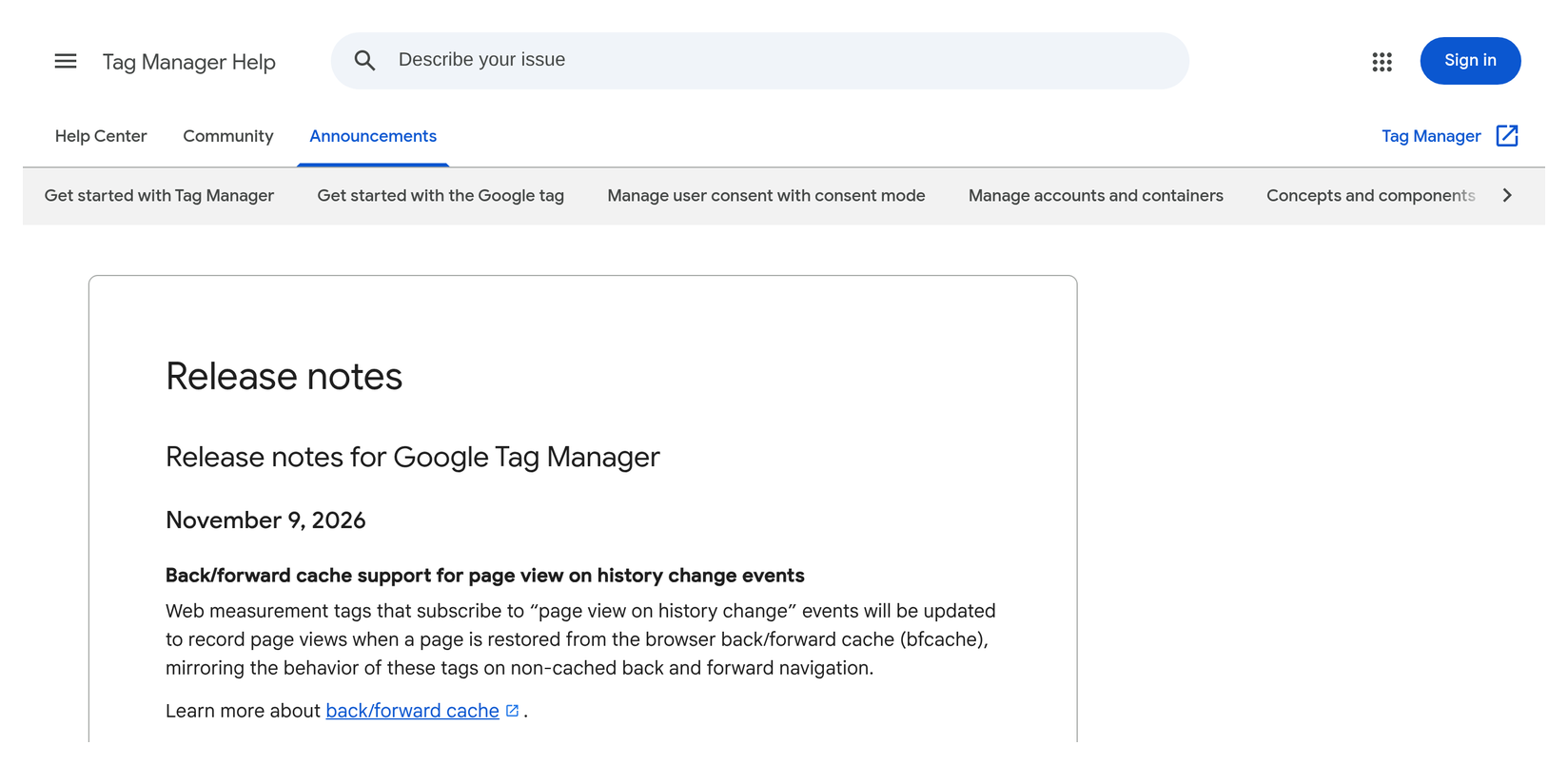
The Tag Manager release note, dated 9 November 2026, says:
“Web measurement tags that subscribe to “page view on history change” events will be updated to record page views when a page is restored from the browser back/forward cache (bfcache), mirroring the behavior of these tags on non-cached back and forward navigation.”
In plain words:
- The back/forward cache is a browser speed trick. When a shopper leaves a page and then presses Back, the browser can show a saved copy of the page instantly instead of loading it again. Google’s web.dev guide says all major browsers have one.
- Saved copies were often missed. Because the page is not loaded again, page view tags did not fire. Google’s own guide says “many popular analytics libraries don’t measure bfcache restores as new pageviews.”
- Now Google’s tags will count them, the same way they already counted a Back press when the page was loaded fresh.
- How common is Back? Google’s web.dev guide says “Chrome usage data shows that 1 in 10 navigations on desktop and 1 in 5 on mobile are either back or forward.” That is a ceiling, not a forecast — only the returns that come from the saved copy add new views.
- Which tags? Google does not list them. The best-known setting of this kind is GA4’s page view option, where Google’s help says “An advanced setting on this option controls whether the event is sent based on browser-history events.” We treat GA4 with that setting switched on as affected.
Sources: Google Tag Manager release notes — 9 November 2026; web.dev — Back/forward cache; Google Analytics Help — Enhanced measurement events; TrackingDesk, 10 November 2026.
What it means, in plain terms
- Your page views can go up with no extra shoppers. A customer who goes from a category page to a product and back again now adds a view that was often missed before. Same person, same visit, more views.
- Mobile and listing pages are likely to move most. Google’s figures show Back and Forward are twice as common on mobile. TrackingDesk expects the biggest change on the pages people return to: category pages, search results and comparison pages.
- Anything that divides by views will move. Views per session, “product views to basket” rates built on page views, and any home-made conversion rate that uses views as the bottom number.
- Numbers that count people or orders should not. Users, orders and revenue are not page views. Keep your board numbers on those.
- A few setups can now count one thing twice. If your developer added Google’s own suggested fix for this gap in the past (a small script that sends a page view on a Back return), you may now get two page views for one return. And if a sale or lead is counted from a “thank you” page view, a shopper who comes back to that page can count again.
This sits next to two earlier notes. GTM optimized tagging covered why Tag Manager changes should be previewed before peak. GA4 conversion suggestions covered deciding what Google Ads should chase. And AI agent traffic at checkout showed how a conversion rate can move without a single extra sale. Today is about a counting change you did not ask for, arriving 18 days before Black Friday.
Why it matters for the P&L
- A false “traffic is up” story. If page views rise from 9 November, someone will say interest is up. It may just be the counting. Stock, staffing and spend decisions should not rest on views.
- Year-on-year Black Friday reports will be off. Black Friday is 27 November and Cyber Monday is 30 November. Views this year include returns that last year’s numbers missed. Comparing the two flatters this year.
- Conversion rates can fall on paper. If your team works out conversion rate as orders divided by page views, more views means a lower rate — with no change in sales. That can trigger the wrong fix.
- Google Ads believes what it is told. If a GA4 key event built on a thank-you page view feeds Google Ads, a repeat count tells bidding that more sales happened. Smart Bidding then chases more of what seems to work.
- Your own orders are the referee. Your order system did not change on 9 November. Any number that moved while orders did not is a counting change until proven otherwise.
Director checklist
Hand these to your analytics or tracking lead. Most can be done in 30 minutes.
- Mark the date. Add a note in GA4 and in your trading pack: “9 Nov 2026 — Google’s tags start counting back-button returns.” If you see the jump on a later day, note that day too.
- Report shoppers, not page views. For peak and year-on-year reports, lead with users, sessions, orders and revenue. Footnote any page view figure.
- Find every rate that divides by views. Ask which dashboards use views as the bottom number (views per session, view-to-basket, home-made conversion rates). Rebase them on sessions or users, or add a clear note.
- Check for sales or leads counted from a thank-you page view. In GA4 Admin → Data display → Events, look for created events built on page_view of an order or thank-you page and marked as key events. Count sales from the purchase event with a unique order number instead — Google says GA4 “deduplicates purchase events with the same transaction ID.” For leads, consider “Once per session”.
- Check what Google Ads bids on. In Google Ads goals, find any primary conversion that comes from such a GA4 key event. If one exists, fix the source before peak, with your paid media lead in the room.
- Look for the old home-made fix. Ask your developer to search the site and Tag Manager for a script that sends a page view on a Back return (look for “pageshow”). Test one Back press in GA4 DebugView. Two page views for one return means one of them goes.
- Know your GA4 setting — but don’t flip it in a hurry. In GA4 Admin → Data streams → your web stream → Enhanced measurement → Page views → advanced settings, note whether “Page changes based on browser history events” is on. Turning it off now would change your counts again, and sites that change pages without a full reload rely on it to count page views at all.
- Judge on your own orders. Each week, compare GA4 and Google Ads with your order system. A jump in views or conversions with flat orders is a counting change, not demand.
Questions to ask your team this week
- Did our GA4 page views step up from 9 November while users, sessions and orders stayed flat?
- Which of our reports and targets divide by page views?
- Do we count any sale or lead from a thank-you page view — and does it feed Google Ads?
- Did anyone ever add a script to count Back-button returns by hand?
- How will we explain this in the Black Friday year-on-year report?
Caveats
- Google does not list the tags. The release note says “web measurement tags that subscribe to ‘page view on history change’ events”. GA4’s history-based page view setting is our working assumption, shared by TrackingDesk.
- No finish date. Google says the tags “will be updated” but gives no roll-out date. Some properties may change later than others. On 11 November the UK-English version of the release notes page did not yet show the entry; the US-English page did.
- Size is unknown. The 1-in-10 and 1-in-5 figures are Chrome’s share of back and forward navigations, not a forecast of your uplift.
- Google does not say whether Tag Manager’s own History Change trigger, or sites that use the Google tag without Tag Manager, behave the same way. We are not claiming they do.
- Other pixels are not covered. The note is about Google’s tags. It says nothing about Meta, TikTok or other platforms.
- The checklist is Tag Gurus advice, built on Google’s documented behaviour. Test changes before you publish them.
Final thoughts
#31/100 — More page views is not more shoppers. Google’s tags now count the back button, so check what your reports and your bidding count before Black Friday.
This is a fair fix. Back-button returns are real visits to real pages, and they were being missed. But it lands less than three weeks before your biggest trading days, with no fanfare and no finish date. Mark the date. Move your board numbers onto shoppers and orders. Make sure no sale is counted from a page someone can come back to. Then let the extra views be what they are: a better picture of how people shop.
Not sure how your tags count page views and sales today? Run our free GA4 and GTM tracking scan at https://audit.taggurus.co.uk/, email info@taggurus.co.uk, or book a meeting today to discuss.
FAQ
Q: What changed on 9 November 2026?
A: Google’s Tag Manager release notes say web measurement tags that subscribe to “page view on history change” events will record a page view when a page is restored from the browser’s back/forward cache.
Q: Why did our page views go up but not our users?
A: Most likely because back-button returns that were missed before are now counted. The same shopper, in the same visit, adds more views. Check users, sessions and orders before reading it as demand.
Q: Will this double our sales in GA4?
A: The release note is about page views. Google says GA4 deduplicates purchase events that share the same transaction ID. The risk is a sale or lead counted from a thank-you page view, which a returning shopper can trigger again.
Q: Do we need to switch anything on?
A: Google lists no action. It says the tags “will be updated”. It does not give a finish date.
Q: Should we turn off the back/forward cache to keep numbers steady?
A: No. Google’s web.dev guide describes it as a way to make back and forward navigation near instant. Faster pages help shoppers. Fix the reporting, not the speed.
Q: Does this affect Meta or TikTok pixels?
A: Google’s note covers Google’s tags only. It says nothing about other platforms.
Sources
- https://support.google.com/tagmanager/answer/4620708?hl=en (Google Tag Manager Help, “Release notes”; 9 November 2026 — “Back/forward cache support for page view on history change events”: web measurement tags that subscribe to “page view on history change” events “will be updated to record page views when a page is restored from the browser back/forward cache (bfcache), mirroring the behavior of these tags on non-cached back and forward navigation”)
- https://web.dev/articles/bfcache (Google web.dev, “Back/forward cache”, last updated 16 October 2026: all major browsers include a bfcache; “1 in 10 navigations on desktop and 1 in 5 on mobile are either back or forward”; “many popular analytics libraries don’t measure bfcache restores as new pageviews”; pageshow / event.persisted code sample)
- https://support.google.com/analytics/answer/9216061 (Google Analytics Help, “Enhanced measurement events”: page_view sent “each time the page loads or the browser history state is changed by the active site”; advanced setting for browser-history events; listens for pushState, popState and replaceState)
- https://support.google.com/analytics/answer/13366706 (Google Analytics Help, “Change the counting method of key events”: Once per event counts a key event every time it is triggered and is the default for key events not created from Universal Analytics goals)
- https://support.google.com/analytics/answer/12313109 (Google Analytics Help, “Minimize duplicate key events with transaction IDs”: GA4 deduplicates purchase events with the same transaction ID)
- https://trackingdesk.com/news/gtm-bfcache-page-views/ (TrackingDesk, 10 November 2026: “expect a step up in views with no new visitors”; pageshow listener and thank-you page key event double-count risks)
- https://www.gaoptimizer.com/blog/gtm-back-button-tracking/ (GA4 Optimizer, 9 November 2026: warns that old custom back-button fixes may now double-fire)
