
A small script that measured page speed was turned into a tool for taking money from customers.
On 29 October, the prediction market Polymarket paused trading after one of its suppliers was hacked. The supplier was DebugBear, a UK-based website speed monitoring service. Its tracking script ran on Polymarket’s pages. Security researchers found that the version being served that day had been changed to sell users’ positions and move their funds to an attacker’s wallet.
Polymarket is not a shop. But the way it was hit applies to every ecommerce site. Your site also runs scripts from other companies: analytics, ad pixels, chat, reviews, heatmaps, speed tools. Each one runs with the same access as your own code.
For ecommerce and digital directors, the lesson is short: every script on your site can do what your customers can do. Know what runs on your checkout, who owns it, and switch off what you don’t use.
What Polymarket and DebugBear said
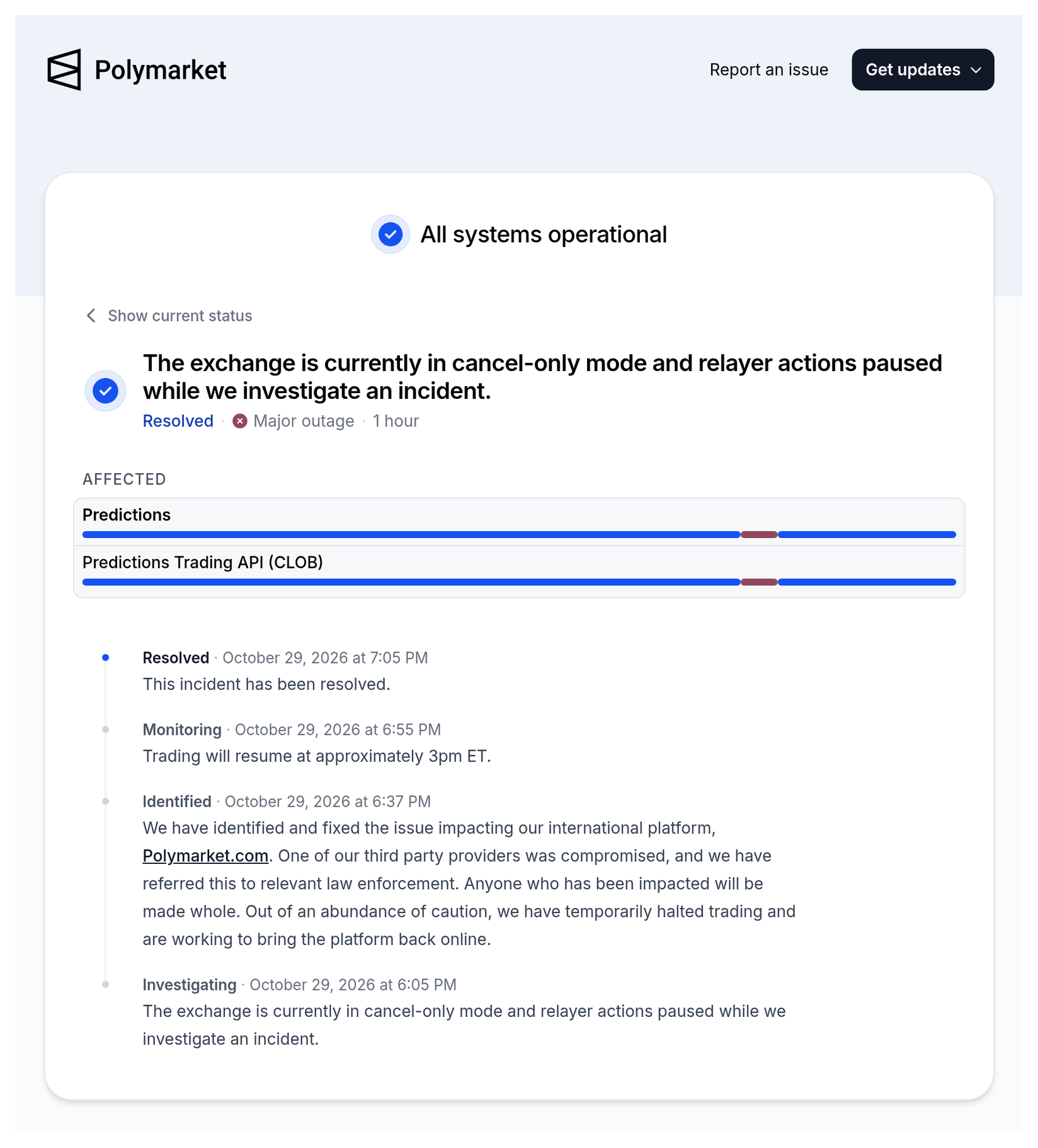
Polymarket posted this on its status page on 29 October at 18:37 UK time:
“We have identified and fixed the issue impacting our international platform, Polymarket.com. One of our third party providers was compromised, and we have referred this to relevant law enforcement. Anyone who has been impacted will be made whole.”
At 18:00 UK time, DebugBear posted on X:
“We're impacted by an ongoing security incident. If you use our RUM product, please remove the embed code from your website.”
RUM stands for real user monitoring. It is a small script that measures how fast pages load for real visitors.
BleepingComputer reported that the bad file was served from DebugBear’s own content network, and that it was “designed to hijack authenticated Polymarket trading sessions, liquidate users' prediction-market positions, and transfer cryptocurrency and other assets to an attacker-controlled wallet.” It traced about $2.5 million to a wallet named in the script. CNBC reported that two analytics firms counted at least $2.7 million withdrawn across 710 wallets. Polymarket says affected users will be repaid.
Sources: Polymarket status page — incident of 29 October 2026; DebugBear on X, 29 October 2026 (both checked 30 October 2026).
What it means, in plain terms
When a visitor opens your website, their browser loads your code and then code from other companies. That code comes straight from the other company’s servers, not yours.
Three things follow:
- A script can change without you changing anything. If the supplier is hacked, the file your site loads can be swapped overnight. Your site looks the same. Nobody on your team pressed publish.
- A script sees what your customer sees. On a checkout page, that can include names, addresses, emails and card details typed into your own forms. On a logged-in page, it can act inside the customer’s session.
- A harmless tool can become a harmful one. The DebugBear script was there to measure speed. Hudson Rock, the researchers who first examined it, put it simply: “A performance-monitoring integration should measure how quickly a page loads.” This one tried to move money.
This is not new. In 2018, attackers changed a third-party chatbot script that Ticketmaster had placed on its payment page. In 2020, the UK Information Commissioner’s Office fined Ticketmaster UK £1.25 million. The BBC reported that the ICO found Ticketmaster “took nine weeks to start monitoring activity on its payments page” after banks warned of fraud.
Why it matters for the P&L
- Fines and claims. UK data protection law expects you to protect customer data, including from scripts you chose to add. The Ticketmaster fine is the UK example everyone in compliance remembers.
- Card rules. Since 31 March 2025, the card industry standard (PCI DSS 4.0.1, requirements 6.4.3 and 11.6.1) expects merchants that host payment page scripts to keep a list of them, approve each one, and watch for changes. Your payment provider and your setup decide exactly how this applies to you.
- Lost sales on your busiest days. Polymarket stopped trading for about an hour. For a shop, switching off checkout or a key script in peak week costs real orders. Black Friday is 27 November.
- Trust. Customers do not care whose script it was. They care that it happened on your site.
- Measurement too. Your tracking tags are scripts as well. A clean, owned list of tags is also how you stop double counting, broken consent and slow pages.
This links to two earlier notes. The script nobody remembers installing is the one that goes quiet first covered old Shopify scripts. If a tag only works by reading your customers' email addresses, Safari may already have switched it off covered tags that read what customers type. Today’s lesson is the same idea, with a sharper edge.
What is not clear yet
- How DebugBear was hacked. Neither company has explained how the attacker got in.
- How many people lost money, and how much. Figures so far come from researchers and news reports, not from Polymarket.
- Whether other sites were hit. Hudson Rock says its evidence “does not identify an attacker or demonstrate a wider compromise affecting other DebugBear customers.” If you use DebugBear, follow its advice and remove the script now.
- How the script was added to Polymarket’s site. It is not known whether it came through a tag manager or the site code. The checks below apply either way.
Sources: BleepingComputer — Polymarket halts trading after crypto-draining script breach, $2.5M traced (Lawrence Abrams, 29 October 2026); CNBC — Some Polymarket user funds stolen by hackers (29 October 2026); Hudson Rock via InfoStealers — Wallet-draining code found in a third-party script (29 October 2026).
Director checklist
- Get one list of every script on your site. Include what is in the site code, in Google Tag Manager, and added by Shopify or Magento apps. For each one, write down what it does and who asked for it.
- Give every script an owner. If nobody can say why a script is there, it is a candidate for removal. Old trials, past agencies and forgotten tools are the usual suspects.
- Start with checkout and account pages. These pages handle card details, addresses and logins. Only scripts that are truly needed there should run there. Speed tools, heatmaps and chat often are not.
- Check who can publish in Google Tag Manager. Tag Manager lets people add code to your live site without a developer. Keep publish rights to a small, named group, turn on 2-step verification, and remove old agency and staff logins.
- Watch for changes. Ask your team or your security partner how you would know if a script on checkout changed tomorrow. If the answer is “we wouldn’t”, fix that before peak.
- Ask your payment provider the PCI question. Find out whether your payment page is hosted by them or by you, and what that means for the script rules in PCI DSS 4.0.1.
- Write a one-page “switch it off” plan. Name who can remove a script fast, how, and who tells customers and the board. DebugBear asked customers to remove its script. Could you do that in an hour on Black Friday?
- Remove what you don’t use, then re-check your tracking. Fewer scripts mean less risk and faster pages. After any removal, check that your GA4, Google Ads and Meta sales still match your own orders.
Questions to ask your team this week
- Do we have one list of every script on our site, with an owner for each?
- Which scripts run on checkout and account pages, and do they all need to?
- Who can publish changes in Google Tag Manager today?
- Would we know if a script on checkout changed overnight?
- Who can switch off a script fast, and how long would it take?
Caveats
- Not every script is a risk of this size. Most suppliers are never hacked. The point is to know what you run and to be able to act fast.
- Tag Manager is not the villain. It is a tool. Used with tight access and a clean list, it makes scripts easier to see and remove, not harder.
- This is not legal advice. For PCI DSS and data protection duties, speak to your payment provider and your legal or security advisers.
- Your books win. After removing scripts, judge the effect on your tracking against your own order system.
Final thoughts
#26/100 — Every script on your site can do what your customers can do. Know what runs on your checkout, who owns it, and switch off what you don’t use.
Third-party scripts make sites better: faster, easier to measure, easier to sell from. They also borrow your customers’ trust. Make the list this week, cut what you don’t need, and make sure you could switch any script off in an hour.
Not sure what is running in your Google Tag Manager or on your checkout? Run our free GA4 and GTM tracking scan at https://audit.taggurus.co.uk/, email info@taggurus.co.uk, or book a meeting today to discuss.
FAQ
Q: What happened to Polymarket?
A: On 29 October, a website speed monitoring script from DebugBear, which ran on Polymarket’s site, was changed by attackers. Researchers found it tried to sell users’ positions and move their funds. Polymarket paused trading for about an hour and says affected users will be repaid.
Q: We are not a crypto site. Does this affect us?
A: The money angle was crypto, but the method was a third-party script. Shops use many of them. The same method has been used before to steal card details, as in the 2018 Ticketmaster case.
Q: What is a third-party script?
A: A piece of code from another company that runs on your pages. Analytics, ad pixels, chat, reviews and heatmaps are common examples.
Q: Do we use DebugBear?
A: Check your site code and Google Tag Manager for “debugbear”. If you find its real user monitoring script, DebugBear has asked customers to remove it.
Q: Is Google Tag Manager safe?
A: Tag Manager is a way to add and manage scripts. It is as safe as the access rules around it. Keep publish rights tight, use 2-step verification and review what is published.
Q: What does PCI DSS say?
A: Since 31 March 2025, PCI DSS 4.0.1 requirements 6.4.3 and 11.6.1 expect payment page scripts to be approved, checked and watched for changes. How it applies depends on how your payment page is set up, so ask your payment provider.
Q: What should we do first?
A: Make one list of every script on your checkout and account pages, with an owner for each, and remove anything nobody can explain.
Sources
- https://status.polymarket.com/cmvtuswgi00221bkzps7w21pt (Polymarket status page, incident of 29 October 2026, “Identified” update at 18:37 UK time: “We have identified and fixed the issue impacting our international platform, Polymarket.com. One of our third party providers was compromised, and we have referred this to relevant law enforcement. Anyone who has been impacted will be made whole. Out of an abundance of caution, we have temporarily halted trading and are working to bring the platform back online.”; incident opened 18:05, resolved 19:05 UK time)
- https://x.com/DebugBear/status/2115866496643535293 (DebugBear on X, 29 October 2026, 18:00 UK time: “We're impacted by an ongoing security incident. If you use our RUM product, please remove the embed code from your website.”; follow-up 22:16 UK time: “We are aware of a security incident affecting DebugBear and are treating it as a top priority.”)
- https://www.bleepingcomputer.com/news/security/polymarket-halts-trading-after-crypto-draining-script-breach-25m-traced/ (BleepingComputer, Lawrence Abrams, 29 October 2026: malicious JavaScript served from DebugBear’s CDN, “designed to hijack authenticated Polymarket trading sessions, liquidate users' prediction-market positions, and transfer cryptocurrency and other assets to an attacker-controlled wallet”; about $2.5 million traced)
- https://www.cnbc.com/2026/10/29/polymarket-reports-outage-on-international-exchange-halts-trading.html (CNBC, 29 October 2026: issue stemmed from a hack of DebugBear according to a person familiar; referred to UK law enforcement; analytics firms counted at least $2.7 million withdrawn across 710 wallets; US platform not compromised)
- https://www.infostealers.com/article/polymarket-breach-alert-wallet-draining-code-found-in-a-third-party-script/ (Hudson Rock research, 29 October 2026: “A performance-monitoring integration should measure how quickly a page loads.”; evidence “does not identify an attacker or demonstrate a wider compromise affecting other DebugBear customers”)
- https://www.bbc.co.uk/news/technology-54931873 (BBC News, 13 November 2020: ICO fined Ticketmaster UK £1.25m after a 2018 attack through a third-party chatbot on its payment page; Ticketmaster “took nine weeks to start monitoring activity on its payments page”)
- https://blog.pcisecuritystandards.org/coffee-with-the-council-podcast-guidance-for-pci-dss-e-commerce-requirements-effective-after-31-march-2025 (PCI Security Standards Council, 26 March 2025: requirements 6.4.3 and 11.6.1 effective 31 March 2025, “ensuring that payment page scripts are properly authorized, checked for integrity, and monitored for tampering”)
