
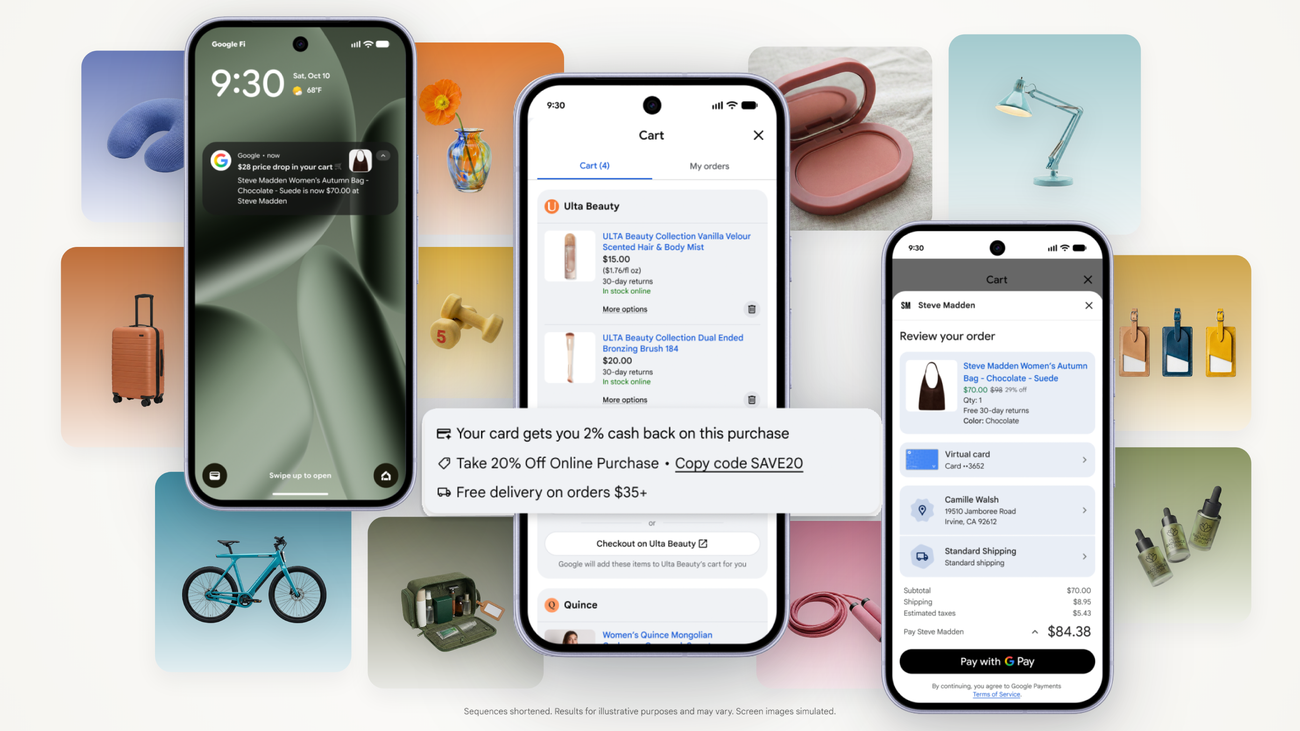
Google launched Universal Cart in the United States on 15 October 2026. Shoppers can save products from more than one store in Google Search and the Gemini app, get price-drop and restock alerts, then check out with Google Pay or send the basket to your site.
For ecommerce and digital directors, the product is interesting. The measurement question is sharper: can you see the save, or only the handoff?
This is distinct from our earlier note on AI checkout sales that GA4 and pixels never see. Here the focus is Universal Cart’s save → transfer path, what Merchant Center reports, and what to check before peak.
What Google launched
Suresh Ganapathy, Senior Director of Product Management for Consumer Shopping, called Universal Cart “your new hub for shopping on Google.” It rolls out in the U.S. across Search and the Gemini app.
Shoppers can:
- Save products from multiple retailers wherever they shop on Google
- Track price and stock changes across the list
- See promo codes and payment suggestions (built on Google Wallet)
- Check out with Google Pay in the cart, or transfer items to the merchant’s site
Named examples include Nike, Sephora, Target, Ulta Beauty, Walmart, Wayfair, and many Shopify merchants. Google says the merchant remains the seller of record either way.
Source: Google — An intelligent new shopping cart (Suresh Ganapathy, 15 October 2026).
The gap: saves stay with Google
The consumer post does not say what reaches your servers when someone saves a product. That sits in Google’s Universal Commerce Protocol (UCP) and Cart API guides, as analysed by Brandon Lazovic and reported by Luís Rijo on PPC Land the day after launch.
According to that documentation-based read:
- Google accumulates saved items locally. It does not call your cart API each time a shopper adds something.
- You get one CreateCart-style call when the shopper presses transfer — the full basket in a single request.
- This release is one-way. Updating, deleting or syncing cart contents between Google and your system is not supported.
- Merchant Center UCP reporting starts at “Clicks to Buy” / cart transfers. The metrics Lazovic cites do not list a count of products saved.
Lazovic is explicit: he has not used Universal Cart as a shopper or run a transfer against a live store. The reporting gap is read from the documentation, not observed in an analytics account. Verify in your own Merchant Center and logs when you have access.
Source: PPC Land — Google’s Universal Cart calls retailers once, and only at transfer (Luís Rijo, 16 October 2026).
Search Engine Journal reaches the same point: UCP Analytics tracks Buy clicks through purchases and cancellations, plus cart-transfer metrics such as number of transfers and average cart value — not saves.
Source: Search Engine Journal — Google’s Universal Cart Is Live: How Carts Get To Your Store (Matt G. Southern, 15 October 2026).
Transfer vs native checkout
Two routes in Merchant Center’s UCP hub:
- Cart transfer — Google sends items to your site; the shopper finishes on your pages. On-site GA4 and pixels can fire once they land — if you can recognise the session.
- Native checkout on Google — purchase completes with Google Pay on Google’s surface. Your storefront tags may never run.
For Shopify, SEJ notes Shopify’s Google AI Mode & Gemini Channel help: Google Analytics and Custom Pixels do not fire on Direct Checkout. SEJ could not confirm whether Universal Cart in-cart purchases use that same path — treat native checkout as a likely blind spot for client-side tags until you prove otherwise.
A transfer is different. Tags can fire on your domain. The risk is labelling, not silence.
Why an untagged continue_url looks like ordinary Google or Direct
On transfer, your system returns a continue_url — the link to your filled cart. You control its parameters.
Without a marker, a shopper arriving from Google with a full cart can land in GA4 as ordinary Google or Direct traffic — the same blind spot untagged AI referral links created. You cannot separate Universal Cart transfers after the fact.
Tag the continue_url from day one. Then you can build a GA4 segment on transfers — still without a save count upstream.
Why it matters for your P&L
Saves are the upper-funnel signal you use for interest and abandoned-cart logic. If they stay inside Google, your own add-to-cart and abandon rates will understate demand that never reaches your site.
What you can manage: transfer volume and average cart value at handoff (Merchant Center), on-site conversion after transfer (GA4 and backend), and native-checkout orders reconciled to your till. Channel stories that assume “Google Shopping interest = site add-to-cart” will misread the funnel once Universal Cart touches your catalogue.
A simple example (illustrative)
This is a made-up example to show the reporting shape. It is not a real client, and it is not observed Universal Cart data.
A shopper saves your £89 jacket on Monday in Search, adds another brand’s accessory in Gemini on Wednesday, then transfers only your jacket on Friday and buys.
- GA4 with a tagged continue_url: Friday session marked as Universal Cart transfer, then purchase.
- GA4 without a tag: same Friday session, often google / organic or Direct.
- Merchant Center UCP (per docs analysis): a transfer / Clicks to Buy style metric — not the Monday save.
- The Monday save does not appear in a report you can open on your side.
Director checklist
- Confirm you are in Universal Cart. U.S. launch first; check the UCP hub and which path you support (transfer, native checkout, or both).
- Map the two paths separately. Transfer = on-site measurement possible. Native checkout = assume GA4/custom pixels may miss the purchase; plan order reconciliation.
- Tag the continue_url before peak. Untagged transfers are not recoverable later.
- Build a GA4 view of transfers only. Compare transfer landings → purchase rate to normal sessions.
- Open Merchant Center UCP Analytics. Note what you see (Buy clicks, transfers, purchases) and what you do not (saves).
- Align abandoned-cart and CRM. Emails that fire only on your site’s add-to-cart will miss Google-only saves.
- Keep this separate from AI checkout reporting. Series #7 covered completed sales tags never see. Universal Cart adds a pre-purchase save you also cannot see — until transfer or native order confirmation.
Questions to ask your team this week
- Are we enabled for cart transfer, native checkout, or both?
- Does our continue_url already carry a tracking parameter?
- Can we name Universal Cart transfers in GA4 today?
- For Shopify: is Direct Checkout on, and have we tested whether GA / Custom Pixels fire?
- Who reconciles native-checkout orders to backend revenue?
Caveats
- U.S. first. Search and Gemini app; YouTube and Gmail were in the May preview but not confirmed in the October post.
- Docs, not live observation. Lazovic’s reading is from Google’s guides. Verify when you have access.
- SEJ could not confirm Universal Cart in-cart purchases match Shopify Direct Checkout for pixels.
- We are not against the product. Measure what you control: tagged transfers, on-site conversion, and backend orders.
Final thoughts
#18/100 — The cart your customer filled on Google is not a cart you can measure — until they send it to you.
Universal Cart moves the save inside Google. Your first reliable merchant-side signal, per the published docs analysis, is the transfer (or a native checkout order). Tag the continue_url, split the two paths in reporting, and judge holiday performance on transfers you can name plus orders your till can prove.
Not sure whether Universal Cart transfers would show up cleanly in your GA4? Run our free GA4 and GTM tracking scan at https://audit.taggurus.co.uk/, email info@taggurus.co.uk, or book a meeting today to discuss.
FAQ
Q: What is Google Universal Cart?
A: Google’s shopping cart across Search and the Gemini app (U.S. launch, 15 October 2026). Shoppers save items from multiple retailers, get alerts, and check out with Google Pay or transfer the basket to the merchant’s site. Merchant stays seller of record.
Q: Can I see when someone saves my product?
A: Not according to the Cart API / UCP reporting pages analysed after launch. Google holds saves locally; merchant reporting starts at Clicks to Buy / cart transfers. Confirm in your Merchant Center when you have access.
Q: What is a cart transfer?
A: The shopper sends Universal Cart items to your site. Google’s Cart API creates a cart on your system (CreateCart) and your continue_url opens a filled cart on your domain.
Q: Will GA4 fire on native checkout on Google?
A: Often no for client-side tags. Shopify’s Direct Checkout docs say Google Analytics and Custom Pixels do not fire on that path. Test or reconcile to orders.
Q: How is this different from AI checkout tracking gaps?
A: AI checkout (our #7/100) is about completed sales your tags never see. Universal Cart adds an earlier gap: saves you cannot count until transfer or native order confirmation.
Q: What should we do before peak?
A: Confirm UCP path(s), tag continue_url, build a GA4 transfer segment, open Merchant Center UCP metrics, and agree how native-checkout orders enter the board pack.
Sources
- https://blog.google/products-and-platforms/products/shopping/universal-cart-launch/ (Suresh Ganapathy, Google, 15 October 2026: Universal Cart U.S. launch across Search and Gemini app; multi-retailer saves; alerts; Google Pay or transfer to merchant; merchant seller of record)
- https://ppc.land/googles-universal-cart-calls-retailers-once-and-only-at-transfer/ (Luís Rijo, 16 October 2026: analysis of Brandon Lazovic’s documentation read — local accumulation of saves, single call at transfer, no update/sync this release, UCP Analytics from Clicks to Buy, tag continue_url; Lazovic notes gap is from docs not observed in a live analytics account)
- https://www.searchenginejournal.com/google-universal-cart-store-handoff/593145/ (Matt G. Southern, 15 October 2026: cart handoff via CreateCart; one-way first release; Merchant Center UCP funnel; Shopify Direct Checkout may not fire GA/Custom Pixels)
