
Google Ads Demand Gen Campaign Type Attribution: What Ecommerce Directors Should Check Before Moving Budget
Google is testing a new way to give credit to Demand Gen campaigns, the Google Ads campaigns that show visual ads in places like YouTube, Discover and Gmail. It is called Campaign Type Attribution, and it is in beta.
The idea is fair. Meta and TikTok usually give their own ads full credit for a sale, even when other ads were involved too. Google's standard model shares the credit between all the Google ads a shopper saw. So Demand Gen can look weaker than social when you compare the numbers side by side.
The catch: once Demand Gen takes full credit too, the same sale can be counted more than once. Add up the rows and you get more sales than you actually made. If that number drives your budget split, you can move money to the wrong place.
Here is what Google has said, what changes in your reports, and six checks to run before anyone moves budget.
What changed (in plain English)
Google's help page describes the feature like this:
"Campaign Type Attribution is a measurement and optimization feature that isolates the performance of Demand Gen campaigns from other Google Ads campaign types. This allows you to bid towards Demand Gen-scoped conversions and have direct comparison against other ad platforms."
Source: Google Ads Help — About Campaign Type Attribution (fetched 17 October 2026). The beta was spotted by Hana Kobzová and reported by PPC News Feed on 16 October 2026.
Google explains how the credit moves:
"This means that Demand Gen will not split fractional credit with other campaign types and other campaign types will not share credit with Demand Gen."
In plain English:
- Today, Google shares one sale between its ads. If a shopper saw a Demand Gen ad, then a Performance Max ad, then a Search ad, the sale is split between them.
- With the beta switched on, Demand Gen is treated like its own ad platform. It can take full credit for a sale it was part of, the way Meta does.
- Search and Performance Max get their share back. They split the credit between themselves, as if Demand Gen was not there.
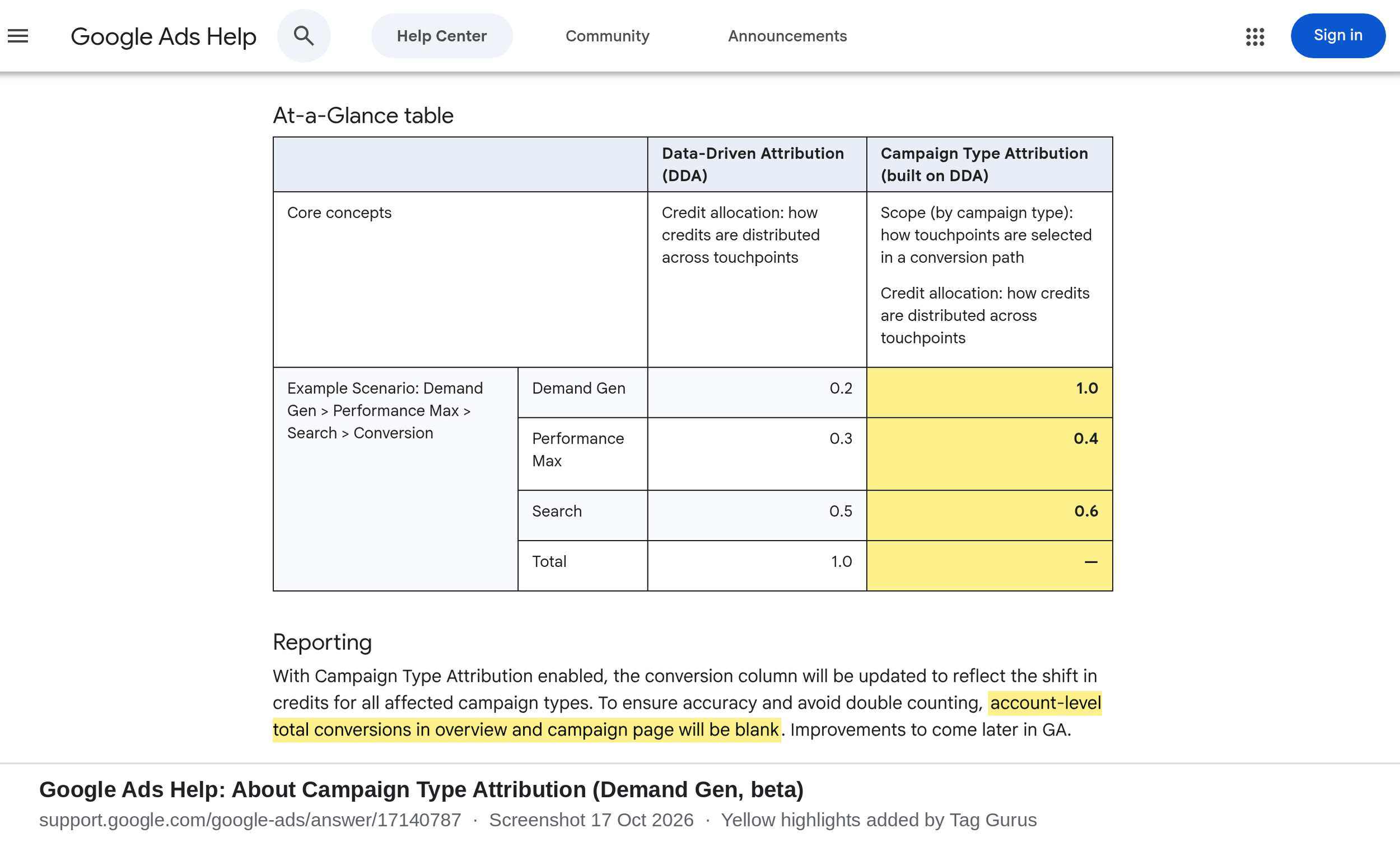
- So one sale can be credited more than once. Google's own example on the help page gives Demand Gen 1.0, Performance Max 0.4 and Search 0.6 for a single conversion.
Why the total goes blank
Google knows the rows no longer add up. Its help page says:
"To ensure accuracy and avoid double counting, account-level total conversions in overview and campaign page will be blank."
That is honest, and it is the key point for directors. With this beta on, there is no single Google Ads total any more. Anyone who adds up campaign rows, or adds Google to Meta and TikTok, will get a number bigger than your real orders.
Other details that matter
- It is a beta, by invitation. Google says: "If you're interested in this feature, reach out to your Google sales representative." PPC News Feed reports the setting sits under Goals > Settings in the account that manages your conversion tracking.
- It does not look backwards. Google says it "will be applied moving forward with no backfill." Any before-and-after chart will mix two different ways of counting.
- It needs the right setup. Google lists data-driven attribution on all conversion actions, and Google Ads conversion tracking or Google Analytics Ads-Preferred. It also says: "Standard Google Analytics imported conversions aren't compatible with Demand Gen Campaign Type Attribution at this time." If your sales reach Google Ads through a GA4 import, check this first. (We covered a similar GA4-import gap in our post on video impressions in Google Ads conversion paths.)
- Google suggests counting views too. It says it is "highly recommended to enable both Demand Gen Campaign Type Attribution and view-through conversion (VTC) optimization." A view-through conversion is a sale from someone who saw a YouTube ad but did not click it. That brings Google closer to how social platforms count, and it will credit even more sales to Demand Gen.
- It changes bidding, not just reports. This is not the same as the existing "Conversions (Platform Comparable)" column, which is for reporting only. With the beta on, Demand Gen bids towards its own, fuller count.
- You may not need it. Google says that if almost all of your budget goes to Demand Gen, switching it on will not change your results.
Why it matters for your P&L
Fairer comparisons are useful. If Demand Gen has been judged on a stricter rule than Meta and TikTok, you may have been under-investing in it. This beta can fix that.
But "apples-to-apples", as Google puts it, means Google now counts more like the social platforms. Each one gives itself full credit. None of them subtracts what the others claimed. The sum of all platform reports will be larger than your real sales, and the gap can grow as you turn on more full-credit models.
Budget decisions should rest on numbers no ad platform marks itself: backend orders, revenue and margin, and controlled tests.
A simple example (illustrative)
This is a made-up example to show the maths, using the credit split from Google's own help page example. It is not a real client.
A shopper sees a Demand Gen ad on YouTube, later clicks a Performance Max shopping ad, then searches for the brand and buys a £100 jacket.
- Standard data-driven attribution: the £100 is shared. Using Google's example split, Demand Gen gets £20, Performance Max £30 and Search £50. Total: £100.
- With Campaign Type Attribution: Demand Gen gets £100. Performance Max gets £40 and Search £60. The campaign rows now add up to £200.
- Add Meta: if the same shopper also clicked an Instagram ad, Meta may claim the full £100 too. Platform reports now say £300.
- Your till says £100.
Nothing is wrong with any single report. The mistake is adding them together.
Director checklist
- Decide if you need it. If Demand Gen is a small part of a mixed Google Ads account and you want to compare it fairly with Meta or TikTok, it may help. If Demand Gen is almost all your Google spend, Google says it will not change your results.
- Check your setup first. Confirm data-driven attribution is on for every conversion action, and that sales reach Google Ads through Google Ads conversion tracking or GA4 Ads-Preferred, not a standard GA4 import.
- Take a snapshot before you switch. There is no backfill. Save at least four weeks of conversions, conversion value and ROAS by campaign type, plus backend orders and revenue for the same days. Mark the switch-on date on every chart.
- Stop adding up the rows. Tell your team and agency that campaign rows and platform reports are not to be summed into a "total sales" figure. Use backend orders, and total revenue divided by total ad spend across every channel.
- Review targets and budget rules. Reported ROAS for Demand Gen is likely to rise, and Search and Performance Max figures will shift too. Agree what targets mean before anyone moves budget on the new numbers. Decide up front whether view-through sales count, and how much.
- Prove it with a holdout test. Before a big shift into Demand Gen, run a Google Ads Conversion Lift study or a geo test. That shows the sales the ads actually created, not just the ones they touched.
Questions to ask your team this week
- Has anyone asked our Google rep about the Campaign Type Attribution beta, or switched it on?
- Do our sales reach Google Ads through the Google Ads tag, GA4 Ads-Preferred, or a standard GA4 import?
- Which reports add up conversions across campaigns or platforms?
- What would make us move budget from Meta or Search into Demand Gen, and how will we test it?
Caveats
- It is a beta. Google invites accounts through sales reps and has not published a date for wider release.
- Google's example numbers are an example. The 1.0 / 0.4 / 0.6 split is from Google's help page to show how the model works. It is not a benchmark.
- We are not against the feature. Fair comparison with social is a real benefit. We are saying judge budget moves on orders, margin and tests, not on platform totals.
- Consent still applies. Attribution models can only credit sales your tags are allowed to measure.
Final thoughts
#17/100 — If every channel takes full credit for the same sale, your totals will add up to more than you sold.
Campaign Type Attribution can give Demand Gen a fairer hearing against Meta and TikTok. It also removes the one Google Ads total you could trust to add up. Snapshot before you switch, stop summing platform reports, and use a lift test before moving serious budget.
Not sure how your Google Ads, GA4 and social numbers fit together? Run our free GA4 and GTM tracking scan at https://audit.taggurus.co.uk/, email info@taggurus.co.uk, or book a meeting today to discuss.
FAQ
Q: What is Google Ads Campaign Type Attribution?
A: A beta feature for Demand Gen campaigns. In Google's words, it "isolates the performance of Demand Gen campaigns from other Google Ads campaign types", so Demand Gen can take full credit for sales it was part of, as social platforms do.
Q: Why is my account-level conversion total blank?
A: Because with the beta on, one sale can be credited to Demand Gen and to other campaign types. Google leaves the total blank "to ensure accuracy and avoid double counting".
Q: Can I switch it on myself?
A: Google's help page says to contact your Google sales representative. PPC News Feed reports the setting sits under Goals > Settings in the account that manages conversion tracking once access is granted.
Q: Does it work with GA4 conversions?
A: Not with standard GA4 imported conversions. Google says you need Google Ads conversion tracking or Google Analytics Ads-Preferred.
Q: Will my past data change?
A: No. Google says it applies "moving forward with no backfill", so take a snapshot before you switch.
Q: Should we move budget into Demand Gen if its ROAS jumps?
A: Not on that number alone. Check backend orders and revenue, and run a lift test to see what the ads actually added.
Sources
- https://support.google.com/google-ads/answer/17140787 (Google Ads Help, About Campaign Type Attribution, fetched 17 October 2026: definition, credit logic, example table, blank account totals, no backfill, eligibility, GA4 import limit, VTC recommendation, Platform Comparable comparison)
- https://ppcnewsfeed.com/ppc-news/2026-10/demand-gen-gets-campaign-type-attribution-in-beta/ (PPC News Feed, 16 October 2026: beta reported, spotted by Hana Kobzová; requirements; Goals > Settings)
- https://business.google.com/us/accelerate/announcements/campaign-type-attribution/ (Google, Campaign Type Attribution announcement page: "attribute and bid toward all Demand Gen conversions, without the influence of other Google campaign types")
