
Most cookie banners are judged on one thing: does a box pop up? The question that matters more is what your Google tags do before anyone clicks it.
Google’s main help page on consent mode now gives two different answers to that question. One line says tags start in a consented state unless a choice has been made. A table on the same page says they start as denied. On 20 October 2026, Consent Mode HQ published a write-up of the change, plus a simple test of what tags actually did.
For ecommerce and digital directors, the lesson is short: do not let a help page decide your default. Write it into your site.
This is a different point from our earlier note on consent mode as the single switch between GA4 and Google Ads. That post was about what the switch controls. This one is about where the switch sits when the page first loads.
What Google’s page now says
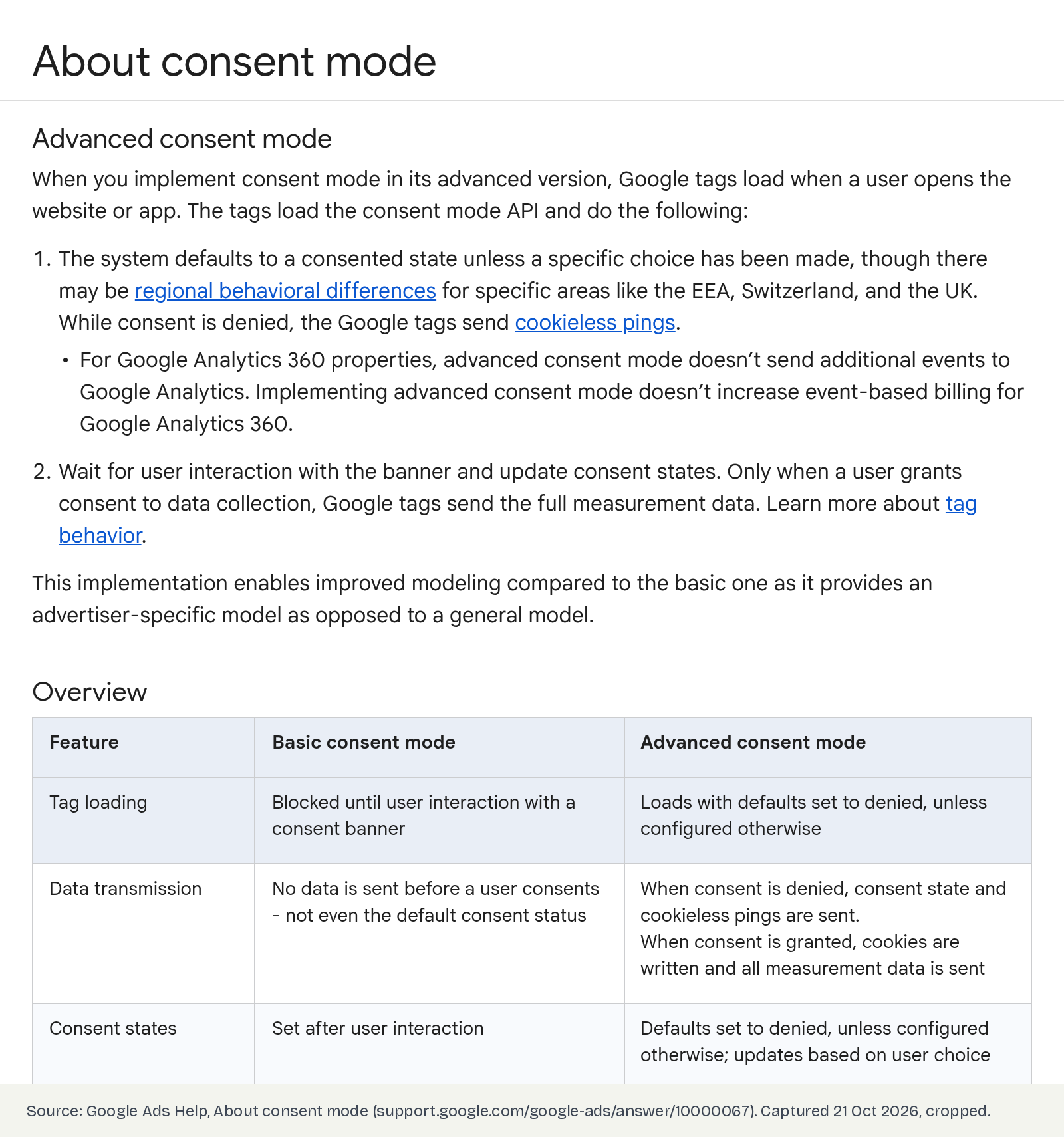
Google Ads Help’s “About consent mode” article describes advanced consent mode (tags load straight away and adjust to the visitor’s choice). Its first step now reads:
“The system defaults to a consented state unless a specific choice has been made, though there may be regional behavioral differences for specific areas like the EEA, Switzerland, and the UK.”
Further down, the same page’s comparison table says advanced consent mode “Loads with defaults set to denied, unless configured otherwise.”
We checked the page on 21 October 2026. Both lines are still there.
Source: Google Ads Help — About consent mode (checked 21 October 2026).
What changed, and what a test showed
Consent Mode HQ compared older copies of the page. According to its write-up:
- On 11 June 2026, the step read: “By default, consent will be denied, unless you set your own defaults.”
- By 2 July 2026, it read “defaults to a consented state”, and it still does.
- In a test on 11 October 2026, from a connection in Mexico, a GA4 tag with no consent default sent a page view with no consent state at all, and wrote GA4 cookies before anyone clicked anything.
- With an all-denied default added, the same page view carried a denied consent state and wrote no cookies.
Consent Mode HQ did not test from the UK, EEA or Switzerland. So nobody can tell you from this test whether a missing default behaves differently for UK visitors. Their advice, and ours: do not rely on it either way.
Source: Consent Mode HQ — Google Now Says Consent Mode ‘Defaults to a Consented State’ (20 October 2026).
What Google’s developer guide says
Google’s developer guide for setting up consent mode is clearer than the help page. It says: “By default, no consent mode values are set.” It tells you to set the default “on every page of your site before any commands that send measurement data”, and warns that if consent code runs out of order, “consent defaults won’t work.”
It also suggests scoping defaults to the regions where you show a banner, so you keep measurement where no banner is needed.
Source: Google for Developers — Set up consent mode on websites (page last updated 13 October 2026).
Why it matters commercially
1. Risk. If your site never states a default, your tags may behave as if the visitor said yes before they have said anything. Consent mode is a Google requirement. It does not make tracking lawful on its own. In the UK, PECR and UK GDPR still apply, and the ICO sets the expectations for your banner. That is a conversation for your DPO or legal team, not a reporting setting.
2. Data you cannot trust. A page view with no consent state is hard to explain later. If a regulator, a customer or your own board asks what you collected before consent, “we relied on Google’s default” is not an answer anyone wants to give.
3. Ad performance. Google Ads and GA4 use consent signals for modelling and for ad features. As Maven PPC summarises Google’s guidance, advertisers must share consent signals to keep using ad personalisation and measurement for EEA and UK traffic. A missing or late default puts that at risk, which feeds straight into bidding and reported ROAS.
4. The opposite mistake. A default set to denied with no working update is just as costly. Your banner says yes, your tags still think no, and conversions quietly drop. The fix is a tested pair: a default, then an update.
Director checklist
- Ask one question: “Where is our consent default set, and what does it say?” If nobody can show you, assume it is missing.
- Check the order. The default must run before the Google tag or Tag Manager loads. A banner that loads late can let tags fire first.
- Decide by region on purpose. Denied for the UK, EEA and Switzerland is the usual starting point. For other regions, write down what you chose and why.
- Test before the banner is clicked. In a fresh private window, load the site and do not touch the banner. Ask your developer to confirm what Google tags send and whether GA4 cookies are written.
- Test the update. Accept, then reject. Check that GA4 and Google Ads see the change on the same page, not only after a reload.
- Check every template. Checkout, account pages, landing pages and any headless or app-built pages. One page without the default is enough to leak.
- Get a sign-off. Put the default, the regions and the test date in writing, owned by marketing and legal together. Re-test after any CMP, theme or Tag Manager change.
Questions to ask your team this week
- Do we set a consent default ourselves, or rely on our CMP or Google?
- Does it run before Tag Manager on every page, including checkout?
- What happens for a UK visitor who ignores the banner?
- When did we last test accept and reject on a live page?
- Who owns this setting after the next site release?
Caveats
- Google’s page contradicts itself. We are reporting what it says, not guessing which line Google meant.
- One test, one country. Consent Mode HQ tested from Mexico only. UK and EEA behaviour without a default is not shown.
- Not legal advice. Consent mode is a Google requirement, not UK law. Ask your DPO about PECR and UK GDPR.
- Most CMPs set a default. Many sites will be fine. The point is to check, not to panic.
Final thoughts
#19/100 — If your site never tells Google the default, Google’s own help page now says it may assume yes.
A default is one small line of code with a big job. It decides what happens in the seconds before your visitor chooses. Set it yourself, set it first, and test it on every page that takes money.
Not sure what your Google tags do before the banner is clicked? Run our free GA4 and GTM tracking scan at https://audit.taggurus.co.uk/?utm_source=blog&utm_medium=referral&utm_campaign=consent-mode-default-state&utm_content=blog-cta, email info@taggurus.co.uk, or book a meeting today to discuss.
FAQ
Q: What is a consent default?
A: The consent state your Google tags use when a page first loads, before the visitor makes a choice. You set it with a consent “default” command, usually through your CMP or Tag Manager.
Q: What does Google’s help page say now?
A: Google Ads Help’s “About consent mode” says advanced mode “defaults to a consented state unless a specific choice has been made”, with possible regional differences for the EEA, Switzerland and the UK. The table on the same page still says “defaults set to denied, unless configured otherwise”.
Q: Is my UK site affected?
A: We do not know, and neither does the published test, which ran from Mexico. Google mentions regional differences but does not explain them. Set an explicit default so you do not have to rely on either.
Q: We use a cookie banner tool. Are we covered?
A: Most CMPs set a default, but only if they are installed so the default runs before your Google tags. Test it in a fresh private window without clicking the banner.
Q: Will setting a denied default hurt our numbers?
A: Consented visitors are still measured once the banner sends an update. With advanced consent mode, Google uses cookieless signals from non-consented visits for modelling, once your data meets its thresholds. What hurts numbers is a default with a broken update, so test both.
Q: Is this the same as your earlier consent mode post?
A: No. Our #13/100 covered consent mode as the single control between GA4 and Google Ads. This one covers what happens before the visitor chooses.
Sources
- https://support.google.com/google-ads/answer/10000067?hl=en (Google Ads Help, “About consent mode”, checked 21 October 2026: advanced consent mode step 1 says “The system defaults to a consented state unless a specific choice has been made, though there may be regional behavioral differences for specific areas like the EEA, Switzerland, and the UK”; overview table says “Loads with defaults set to denied, unless configured otherwise”)
- https://consentmodehq.com/google-consent-mode-defaults-to-consented-state/ (Consent Mode HQ, 20 October 2026: wording on 11 June 2026 vs 2 July 2026; test on 11 October 2026 from Mexico showed no consent state and GA4 cookies written without a default, denied state and no cookies with one; not tested from EEA, Switzerland or UK)
- https://developers.google.com/tag-platform/security/guides/consent (Google for Developers, “Set up consent mode on websites”, last updated 13 October 2026: “By default, no consent mode values are set”; set the default on every page before measurement commands; order matters; region-scoped defaults)
- https://mavenppc.com/news/google-consent-mode-v2-uk-advertisers (Maven PPC, 17 October 2026: consent mode is a Google requirement, not UK law; PECR and UK GDPR apply separately; Google’s EU user consent policy covers the EEA, UK and Switzerland)
